
The standard TikTok video length limit is 10 minutes for in-app recording, but videos uploaded from a device can reach 60 minutes, depending on your account's rollout status. The practical limit you can rely on is therefore different from the maximum TikTok may display for selected accounts.
You've probably encountered the problem already. You open TikTok, tap the create button, start filming a tutorial, and discover that the native recording workflow won't accommodate the full version. Or you spend hours editing a long interview, only to find that your account doesn't accept the extended upload. TikTok video length isn't just a technical detail. It determines how you script, record, edit, review, and publish.
The right question isn't “How long can a TikTok be?” It's “Which production path gives this idea the best chance of holding attention?”
Current TikTok Video Length Limits Explained
TikTok currently operates with two important duration ceilings:
- In-app recording: Videos recorded inside TikTok can be up to 10 minutes long, according to TikTok's official camera tools guidance.
- Device uploads: Videos uploaded from outside the app can be up to 60 minutes long, although access to that longer upload option can depend on account rollout and availability.
That split changes the way you should plan production. If you're filming directly in TikTok, treat 10 minutes as the reliable universal ceiling. If you're exporting a finished video from an editor and uploading it, your account may support the longer limit.
Why TikTok has two different caps
Native recording and external uploading serve different workflows. In-app capture is designed for quick creation, native effects, sounds, filters, text, and immediate publishing. TikTok can control that experience more tightly, so the app presents a shorter operational ceiling for recording.
External uploads support a more deliberate production process. A creator can record with a camera, edit a lecture, assemble an interview, or produce a product demonstration elsewhere before sending the finished file to TikTok. TikTok's support documentation confirms the distinction between videos recorded in the app and videos uploaded from outside it.
That doesn't mean the longer path is automatically better. A 60-minute upload may be technically accepted, but a long file still needs a clear premise, strong pacing, and a reason for viewers to stay.
Practical rule: Build your workflow around the limit you can verify in your own account, not the maximum mentioned in a general guide.
The safe production baseline
For fast-turnaround content, plan around the native ceiling. You'll avoid discovering a limitation halfway through a shoot, and you can use TikTok's built-in creation tools without adding an export step.
For polished long-form content, edit externally first. Resources such as TikTok Reels resources can help teams think through short-form concepts, repurposing, and production formats before they commit to a longer master file.
Keep a shorter version available even when you're preparing a long upload. A concise cut gives you another publishing option if the extended upload isn't enabled, the file fails validation, or the full version needs a stronger discovery entry point.
The Evolution of TikTok Duration Caps
TikTok didn't begin as a long-form video platform. Its original limit was 15 seconds, and that constraint shaped the early creative language: quick visual jokes, compact reactions, fast transitions, and ideas that reached their payoff almost immediately. The platform later expanded to 60 seconds in 2017, giving creators more room for context and sequential storytelling, as documented in this timeline summary of TikTok video lengths.
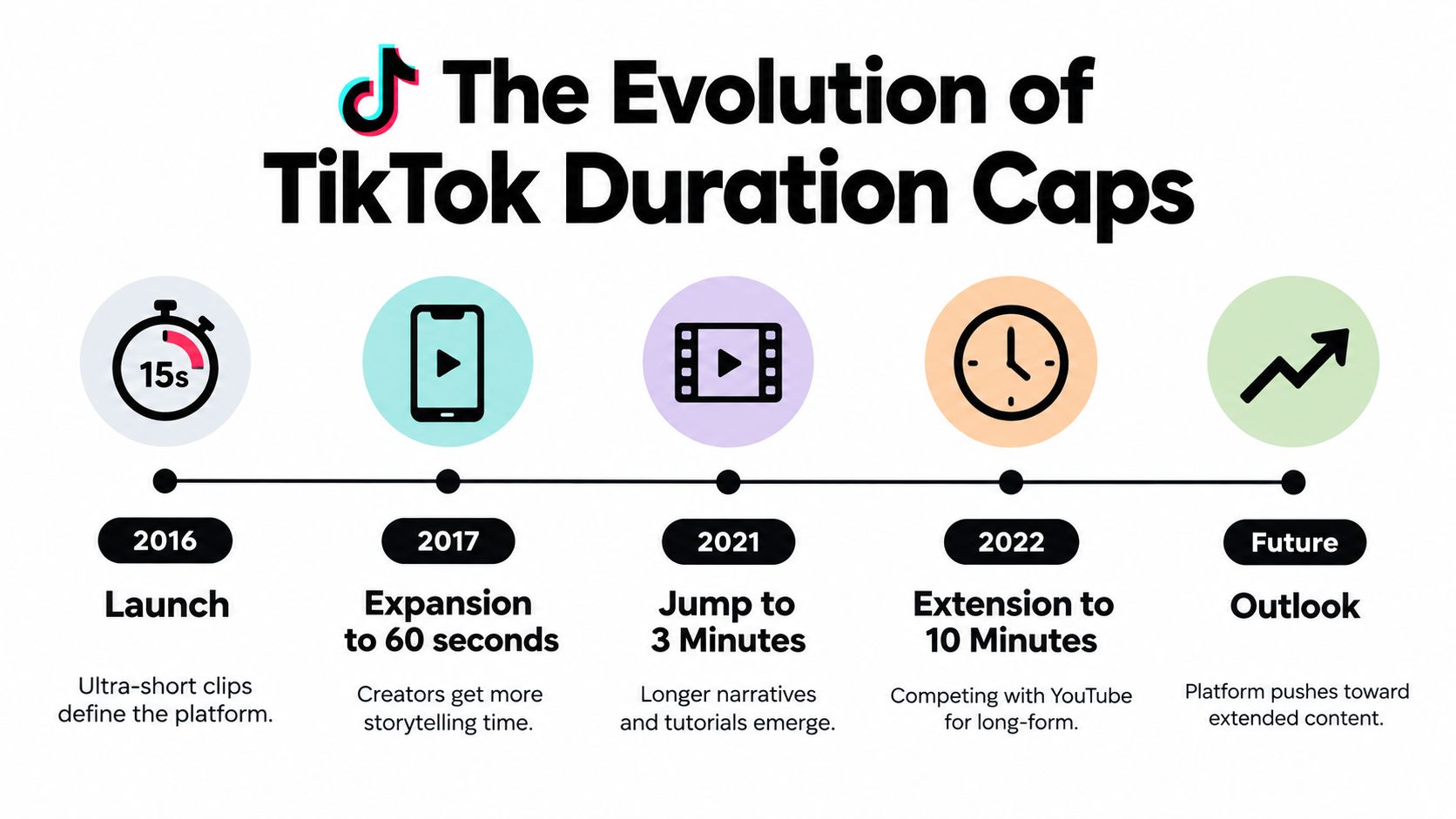
The 2018 Musical.ly merger maintained the 60-second format while TikTok consolidated its identity and audience. The next major change arrived in July 2021, when the platform moved to 3-minute videos. That was more than a larger upload field. It made tutorials, commentary, demonstrations, and narrative explanations easier to produce without splitting every idea into multiple parts.
Each expansion changed the creative brief
The move to 10 minutes in early 2022 pushed TikTok further into territory traditionally associated with longer educational and entertainment formats. Creators could explain a process in one sitting instead of compressing every detail into a short clip. Brands could demonstrate a product more naturally, provided the subject justified the added time.
A separate guide covering 2024 through 2026 describes TikTok's limit as having increased four times and notes testing for 15-minute and 30-minute uploads. Those tests indicate that TikTok has repeatedly explored longer formats as user behavior, competition, and content categories have developed.
The important strategic signal is the direction of travel. TikTok has moved from an ultra-short environment toward a platform that can host both rapid discovery clips and substantial viewing sessions. That doesn't erase the value of brevity. It gives creators more room to match format to subject.
What the history means for planning
Duration expansions tend to create new content possibilities, not new excuses for filler. A longer cap helps when the viewer needs a demonstration, sequence, explanation, or conversation. It hurts when a simple idea gets stretched beyond its natural payoff.
Treat the limit as production capacity. Your creative brief should still specify the shortest version that communicates the point clearly, then expand only where additional context improves the viewing experience.
In-App Recording Versus External Uploads
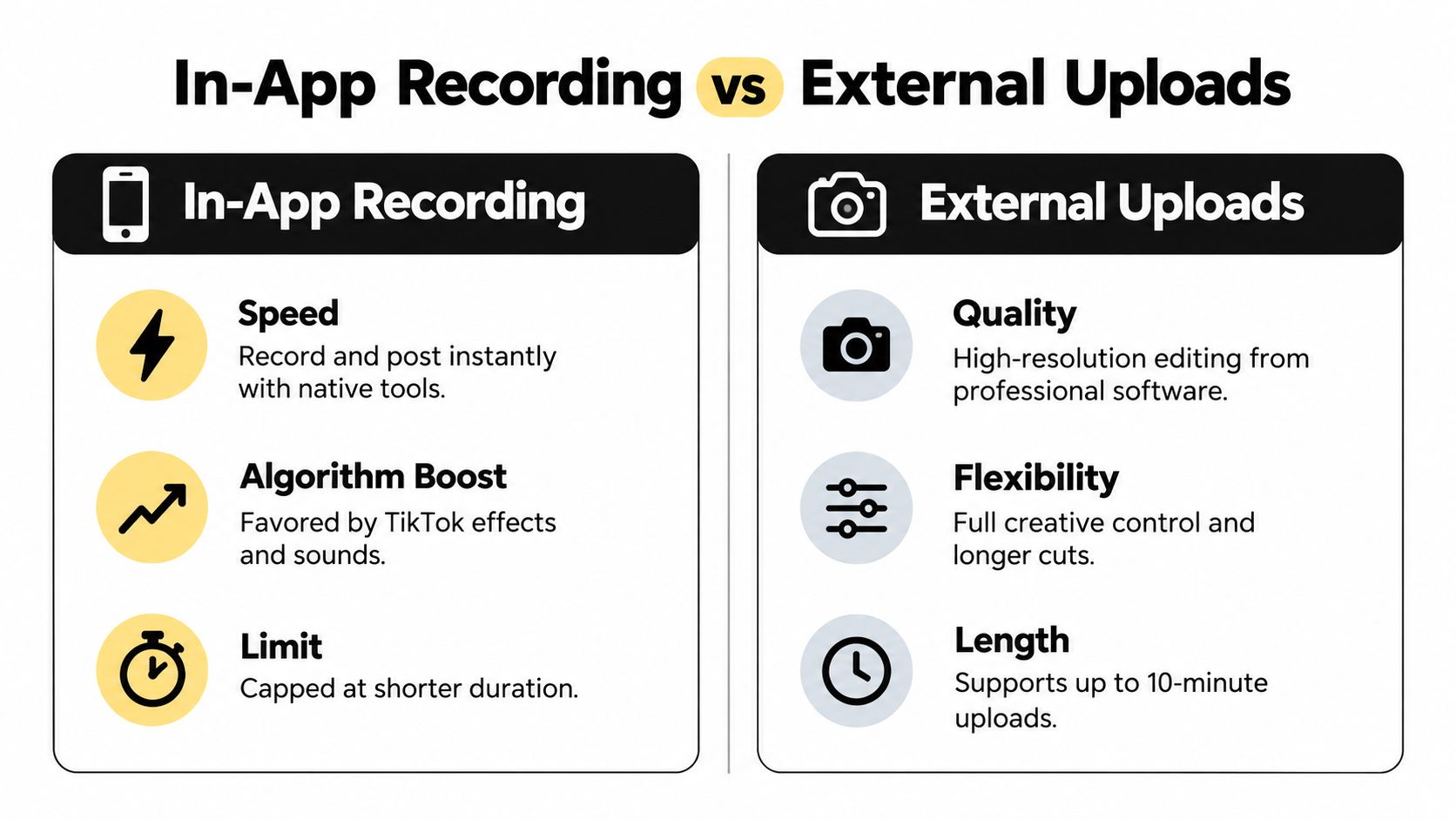
The choice between native recording and external editing is a workflow decision, not merely a duration decision. Both routes can produce effective TikToks, but they optimize for different priorities.
| Workflow | Main advantage | Main trade-off |
|---|---|---|
| In-app recording | Fast publishing with native creation tools | Recording is limited to the in-app ceiling |
| External upload | More editing control and access to longer files | Requires export, transfer, testing, and account verification |
Choose native capture for speed
In-app recording works well when the idea depends on immediacy. Trend participation, quick reactions, direct-to-camera updates, and native effects benefit from a workflow that takes you from concept to post without passing through desktop software.
You can also respond to a trend while it still feels current. That speed matters more than elaborate polish for some formats. A technically perfect video posted after the conversation has moved on may be less useful than a simple, timely response.
Native capture does introduce constraints. You have less control over the full edit, external footage, audio mixing, visual continuity, and revision history. Long explanations can also become awkward if you're trying to record them in one uninterrupted session.
Use external uploads for depth and control
External editing is the better fit for interviews, product walkthroughs, webinars, lessons, and multi-camera recordings. You can remove pauses, rearrange sections, add captions, normalize audio, and create several cuts from one recording.
Editors such as CapCut, Adobe Premiere Pro, and DaVinci Resolve give teams a clearer review process. A brand can approve a master file, create a shorter discovery cut, and preserve the original project for later revisions.
The cost is operational complexity. You need to confirm the export, transfer the file to the correct device or upload path, and test whether your account accepts its duration. The longer upload option isn't guaranteed for every account, so don't make it the only version of an important campaign asset.
Workflow decision: Record natively when speed and trend participation lead. Edit externally when structure, sound quality, revisions, or narrative depth lead.
How to Check Your Account Upload Limits
TikTok's extended upload capability may not appear for every account at the same time. Rollouts can vary by account, region, app version, or testing group, so confirm access before producing a long masterclass or interview.
Run a small upload test
Use this sequence before committing to a major long-form project:
- Update TikTok. Install the current app version available for your device, then reopen the app.
- Start a new post. Tap the create button and choose the upload option rather than native recording.
- Select a test file. Use a nonessential exported clip that represents the file type and workflow you plan to use.
- Check the duration control. Look for the maximum duration presented by the upload interface. Don't assume that a guide's stated maximum applies to your profile.
- Continue through processing. A file may appear selectable but still fail during processing, preview generation, or final publishing.
- Record the result. Note the device, app version, file duration, and any error message so your team can reproduce the test.
The test should happen before editing the definitive version. A short trial can expose an account restriction without putting the finished production at risk.
Diagnose a rejected long file
If TikTok rejects the upload, isolate the cause rather than immediately shortening the content. First, try the same file through the normal mobile upload path. Then test a shorter export from the same editor, keeping the frame size, audio, and file format consistent. This helps distinguish an account duration restriction from a file-processing problem.
A long video can also fail because the export is unusually large, the transfer was interrupted, or the file contains an encoding configuration TikTok doesn't process cleanly. Re-exporting with a standard mobile-friendly profile is often a sensible troubleshooting step, but don't claim the extended limit is active until the interface accepts and processes a representative file.
For teams monitoring content performance after publishing, keep your diagnostics separate from your reporting workflow. A guide such as how to check TikTok analytics can help you review the account data after the technical test is complete.
Don't spend production time on a duration your account hasn't demonstrated that it can accept.
Adapting Content Strategy to Different Durations
Longer availability doesn't make longer videos desirable by default. The duration should follow the viewer's job. If someone needs one visual answer, a compact clip usually serves them better. If they're learning a process or evaluating a product, additional time can create useful context.
Build around the payoff
A short clip needs an immediate premise. Show the result, pose the tension, or demonstrate the visual change before the viewer has a reason to scroll. The edit should remove setup that doesn't contribute to the payoff.
A mid-length explainer can carry a sequence. Introduce the problem, show the method, address the most likely objection, and finish with a clear result or next action. The viewer should always understand why the next moment matters.
Long-form content needs chapters, even when TikTok presents it as one post. Use visible topic shifts, on-screen labels, changes in framing, or questions that reopen curiosity. A long interview without editorial landmarks feels like an unfiltered archive file, not a designed viewing experience.
Match pacing to information density
Pacing isn't the same as speaking quickly. It means giving the viewer a steady stream of relevant movement, evidence, contrast, or explanation. A calm product demonstration can hold attention if every step answers a real question. A frantic edit can lose viewers when the cuts obscure the point.
Use this decision test before exporting:
- One moment or one reaction: Keep the cut tight and let the visual do the work.
- One practical lesson: Give the viewer enough time to see the method and outcome.
- Several connected lessons: Use chapters or split the topic into separate posts.
- A complete conversation: Preserve the full version only when the exchange itself is the value, then identify strong entry points for shorter edits.
The production team should review retention and watch behavior after publishing, then adjust the next cut. For paid campaigns, the same logic supports scripting, testing, and scaling video ads, where a clear opening and disciplined edit matter more than filling the available duration.
Editorial rule: If removing a passage doesn't reduce the viewer's understanding, remove it.
Best Use Cases for Short and Long Formats
A single idea can become several TikToks, but each version needs its own job. Consider a skincare brand launching a new product. The shortest cut might show the application texture and final look. A longer version could explain the routine, answer objections, and demonstrate how the product fits into a broader process.
Compact clips create fast entry points
A 15-second concept suits one visual claim: a before-and-after reveal, a packaging detail, a quick reaction, or a single product feature. The opening frame must carry much of the burden because there's little room for a long introduction.
For a service business, the same format might show one mistake, one correction, or one surprising result. Avoid adding background that belongs in another post. The goal is recognition and curiosity, not a complete course.
Three-minute videos support structured teaching
A 3-minute video has room for a setup, demonstration, and explanation. A B2B consultant could break down a client onboarding mistake, show the improved process, and finish with a practical checklist. An educator could explain one concept with an example rather than racing through several disconnected points.
The format works best when the topic has a natural progression. Don't turn a single sentence of advice into a three-minute monologue. If the viewer can apply the lesson after a few focused steps, the video has earned its duration.
Extended uploads serve complete experiences
A 30-minute-or-longer upload can fit an interview, workshop, podcast segment, software walkthrough, or detailed training session when the audience has a strong reason to spend that time. A founder might use the full conversation for existing followers while publishing shorter excerpts to attract new viewers.
That approach gives the long file a role beyond raw reach. The complete version builds depth, while shorter cuts surface the most useful or emotionally compelling moments. For teams producing many variants, a TikTok video generator can support ideation around hooks and formats, but the final duration still needs human editorial judgment.
For a deeper planning perspective, review this guide on how long a TikTok video should be and compare its recommendations with your own audience's viewing behavior.
Building a Mixed-Length Content Calendar
A calendar built around one duration eventually becomes predictable. If every post is a rapid trend, the audience may not understand what you know or sell. If every post is a long tutorial, you may publish too slowly and give new viewers too few entry points.
A mixed calendar solves both problems by assigning different jobs to different cuts. Short clips support discovery and responsiveness. Mid-length videos explain a product, method, or opinion. Longer uploads serve people who already have enough interest to invest more attention.
Create repeatable content lanes
Start with content lanes rather than isolated ideas:
- Fast response lane: Reactions, trend adaptations, visual reveals, and one-point observations.
- Teaching lane: Tutorials, comparisons, demonstrations, and answers to recurring questions.
- Depth lane: Interviews, detailed walkthroughs, behind-the-scenes discussions, and complete lessons.
- Conversion lane: Product proof, objections, customer questions, and direct next steps.
Each lane should have a defined production workflow. The fast response lane may stay inside TikTok. The depth lane should begin with an external recording and editing plan. The teaching lane can often produce a full version plus several shorter excerpts.

Use daily prompts without surrendering judgment
Creative fatigue often appears as format fatigue. You're not out of expertise, but you keep expressing the same idea in the same shape. Daily ideation tools can introduce fresh angles, seasonal hooks, questions, and trend-aligned prompts that your team can adapt to its actual offer.
Viral.new is one option for this workflow. It delivers TikTok content prompts to an inbox based on a creator's business or offer, helping turn current platform trends into ready-to-shoot concepts. Use the suggestions as a planning input, not as a substitute for audience knowledge, brand voice, or editorial review.
A useful calendar starts with one strong topic, then assigns it several treatments. A product objection might become a quick misconception clip, a focused demonstration, and a longer customer-question session. That creates variety without forcing the team to invent unrelated subjects every day.
Technical Specifications and Quick Reference
Duration is only one publishing constraint. A long video can still fail because the file is too large, the export is poorly encoded, or the visual format doesn't suit the feed. TikTok's official camera tools documentation is the right place to verify the current creation path and duration behavior before a major production.
Export for the viewing environment
Use a vertical composition when the content is designed for the standard mobile feed. Keep important text, faces, product details, and captions away from interface areas that can cover the frame. Review the exported file on a phone, not only in your desktop editor.
For routine exports, use widely supported formats such as MP4 or MOV and check the result after transfer. The exact file-size and encoding requirements can vary by device, app version, upload path, and account, so avoid treating an old specification sheet as permanent platform policy.
Run this pre-upload checklist
- Confirm the route: Decide whether you're recording in TikTok or uploading a finished file from a device.
- Verify the account: Test the upload interface before producing an extended video.
- Check the master duration: Make sure the file fits the limit your account displays.
- Review the first seconds: The opening must communicate the subject before the viewer needs to infer it.
- Inspect captions: Check spelling, line breaks, contrast, and placement on a phone.
- Listen with headphones: Remove hum, clipping, distracting background noise, and abrupt level changes.
- Watch the full export: Look for frozen frames, missing audio, accidental black frames, or corrupted transitions.
- Keep alternate cuts: Save a shorter version for testing, republishing, or use if the long upload is unavailable.
External editing can make this process more reliable because your team can preserve a master project and export multiple versions. If you're comparing tools for that stage, this guide to video editing apps for TikTok can help you evaluate options without confusing editing flexibility with guaranteed platform access.
The key operational principle is simple: verify the upload route first, then edit to the limit it supports. TikTok's duration options can change, but your production pipeline shouldn't depend on an untested assumption.
Viral.new provides daily, trend-aligned TikTok video prompts suited to your business or offer, helping you plan short reactions, structured explainers, and longer content ideas around current audience interests. Visit Viral.new to keep your content calendar supplied with practical concepts you can evaluate, script, and produce.
