
Before we jump into specific app suggestions, let's get one thing straight: the best video editing app for TikTok isn't about having the most bells and whistles. It’s about finding the tool that makes creating high-quality, native-looking content feel completely natural and fast.
The right app streamlines your entire process, from getting clips off your phone to hitting "publish." It's less about complex Hollywood-level features and more about having the right features that click with TikTok's unique, sound-on culture.
What Makes a TikTok Video Editor Truly Great
When you're trying to edit a quick, punchy TikTok, traditional video software often feels like trying to park a bus in a compact spot. It's clunky, oversized, and loaded with tools you'll never touch for a 15-second dance challenge or a quick explainer.
The goal is to find an editor that makes the core TikTok workflow feel like second nature. It should feel like a powerful extension of the TikTok app itself, not some complicated barrier you have to fight through just to get your video out. Speed and viral-friendly features are the name of the game.
Core Features That Matter Most
A great TikTok editor isn't a jack-of-all-trades; it's a master of a few essentials. These are the non-negotiables that separate a tool built for the job from a generic video editor you're trying to force into the role.
- Vertical-First Interface: Your editing canvas should live in the 9:16 aspect ratio. You shouldn't be constantly wrestling with black bars or trying to crop a horizontal video to fit a vertical screen. The whole experience needs to be built for the phone.
- Seamless Sound Integration: On TikTok, sound isn't an afterthought—it's the heartbeat of the content. A good app lets you easily import audio, see the waveform visually, and make your cuts land perfectly on the beat. We break this down even further in our guide on how to use TikTok sounds.
- Engaging Text and Captions: Your editor needs robust tools for adding animated text overlays and, ideally, auto-generating captions. This is critical for grabbing attention in the first few seconds and making your videos accessible to everyone.
- Trend-Ready Effects and Transitions: You need a library of transitions, filters, and effects that are popular on the platform right now. This allows you to jump on trends fast without having to build complex effects from scratch.
The ultimate test for any TikTok editing app is simple: how fast can it take you from a raw idea to a polished, trend-worthy video? The less friction in that process, the better the tool.
This simple philosophy is exactly why certain apps have taken over. Take CapCut, for example. Developed by TikTok's parent company, ByteDance, it has become the default editor for millions of creators. It's so dominant that as of early 2025, it captured a massive 30% share of the 80 million monthly downloads in the video editing app market. You can find more stats like this over at SQ Magazine.
Essential TikTok Editing Features at a Glance
To help you size up any tool you're considering, here’s a quick summary of the features that truly move the needle for TikTok content. If an app doesn't nail these, it's probably not the right fit.
| Feature Category | Why It's Critical for TikTok | Example Application |
|---|---|---|
| Vertical Aspect Ratio | TikTok is a 9:16 platform. Your editor must be built for vertical-first creation to avoid awkward framing and wasted time. | Instantly starting a project in a 9:16 canvas without needing to adjust settings. |
| Sound-Syncing Tools | Sound is foundational. The ability to see audio waveforms and align cuts to the beat is non-negotiable for viral potential. | Tapping a button to automatically place markers on every beat of a song, making precise cuts easy. |
| Dynamic Text & Captions | Viewers often watch without sound initially. Bold text hooks and clear captions grab attention and boost watch time. | Adding animated, attention-grabbing text that pops up in sync with a person talking. |
| Trend-Relevant Effects | Trends move fast. Having a library of popular transitions, filters, and effects lets you participate without delay. | Quickly applying a "glitch" or "zoom" transition that's currently trending on the For You Page. |
| Fast Export Settings | Your app should have pre-set export options optimized for TikTok's specifications (resolution, frame rate, etc.). | A one-click "Export for TikTok" button that renders the video in the perfect format. |
Ultimately, any app that ticks all these boxes will put you in a great position to create content efficiently. It removes the technical roadblocks and lets you focus on what really matters: your ideas.
The Core Workflow Every TikTok Creator Needs to Master
No matter what video editing app you land on, the journey from raw footage to a viral-worthy video follows the same fundamental path. Don't think of this as a rigid set of rules, but more like a mental checklist that gives your content its best shot at grabbing—and holding—attention.
Getting these five steps down is the real secret behind creators who seem to effortlessly pump out high-quality videos that just feel right on the platform. Each step naturally flows into the next, transforming a simple idea into a short-form video that works. It all starts with the most important part of any TikTok: the first three seconds.
1. Crafting an Unskippable Hook
On the For You Page, you're in a ruthless battle for attention. You have less than three seconds to give someone a reason to stop their endless scroll. That's the job of your hook. A killer hook can be a burning question, a wild visual, or a bold statement that piques instant curiosity.
Before you even think about trimming clips, find the single most interesting, shocking, or compelling moment in your footage and slap it right at the very beginning. The goal isn't to give the whole story away; it's to make a promise that what’s coming is worth sticking around for.
2. Nailing the Sound and Rhythm
Sound is the lifeblood of TikTok. Seriously. Your next move is to pick your audio and let it be the skeleton of your entire edit. The best apps will show you the audio's waveform—a visual map of the beats, drops, and lulls in the track.
Use that map to make every cut feel deliberate. When you sync an action or a scene change directly to a beat, the video becomes incredibly satisfying to watch. This is called sound-syncing, and it’s what separates a professional-feeling video from something that feels clunky and amateur.
The best TikToks are built for the ears first, then the eyes. Get the rhythm right, and the visuals will fall into place. Lining up your cuts to the music isn't just a technical trick—it's how you tap into the very culture of the platform.
3. Maintaining Momentum with Transitions and Text
Once your hook has done its job and the rhythm is set, the game shifts to keeping the viewer locked in. This is where you actually build your narrative, using transitions to guide the eye smoothly from one clip to the next. Avoid jarring jump cuts, unless you're using them for a specific comedic or stylistic effect.
At the same time, you need to be layering in text overlays and auto-captions. This isn't just for decoration. Good text does a few jobs at once:
- It spells out your message for the 85% of users who watch videos without sound.
- It highlights the most important takeaways, making your video more memorable.
- It can even act as a second visual hook, keeping people's eyes glued to the screen.
This is where planning really pays off. To keep your ideas organized and on-trend, a simple planner can be a lifesaver. We break down exactly how to map out your videos in our TikTok content calendar template.
4. Polishing with Final Touches
Alright, time to add that final coat of paint. This is all about the little details that make a big difference. Tweak the color grading to make your visuals pop, add a trending sticker or effect, and double-check that your audio levels are clean and balanced. Watch the whole video back from the top and hunt for any tiny adjustments that can take it from "good" to "great."
5. Exporting for Maximum Quality
You've done all the hard work; don't fumble at the finish line. A bad export can compress your beautiful edit into a pixelated mess. Always, always export your video with settings that are optimized for TikTok's platform.
Here are the magic numbers:
- Resolution: 1080p (1080x1920)
- Frame Rate: 30 frames per second (FPS)
- Format: MP4
Many apps have a dedicated "Export for TikTok" preset that handles this for you. Use it. It’s the easiest way to make sure your video looks just as crisp on the For You Page as it did in your editor.
Choosing the Right App for Your Creator Journey
Picking the "best" video editing app for TikTok is a bit of a trap. There’s no single right answer because the perfect tool for a seasoned pro managing brand campaigns would feel like overkill for someone just getting their feet wet. Instead of hunting for the app with the longest feature list, think about matching the software to where you are right now as a creator.
It really comes down to what you’re trying to accomplish. Are you focused on just learning the ropes and getting videos out the door? Are you trying to hop on every trend the second it goes viral? Or are you producing polished, sponsored content where every detail has to be perfect? Each path demands a different toolkit, and picking the wrong one is a fast track to frustration.
The New Creator Getting Started
When you're new to the game, the biggest challenge isn't mastering complex color grading—it's just getting comfortable with the vertical format and hitting "post" consistently. The right app for you should feel intuitive and encouraging, not like you need a film degree to use it. The name of the game is simplicity.
Look for apps that offer:
- A clean, mobile-first interface that makes sense without a 20-minute tutorial.
- Ready-to-use templates that let you recreate popular trends just by swapping in your own clips.
- The absolute basics done well: trimming clips, adding text, and an easy way to find and use trending sounds.
Your goal here is to remove friction. A straightforward, template-heavy app helps you build momentum and get a feel for TikTok's visual language without getting bogged down in technical weeds you don't need to worry about yet.
The Growth-Focused Trend Chaser
Once you've nailed the fundamentals, your priorities shift. Now, it's all about speed and relevance. As a creator focused on growth, you live and die by your ability to jump on trends the moment they pop. Your editing app has to be just as agile, letting you churn out a high-quality video in minutes, not hours.
For the creator chasing growth, speed is your biggest asset. The best app isn't always the most powerful one; it's the one that gets a video from your camera roll to the For You Page the fastest.
This kind of creator needs features built for speed. Think one-click AI effects, automatic captions, and a deep integration with TikTok's sound library. The ability to automatically sync your video cuts to the beat of a song isn't just a nice-to-have; it's essential. Your app should basically be a trend-response machine.
This decision tree gives you a quick visual guide for thinking through your edit, making sure your hook, sound, and overall vibe are all working together.
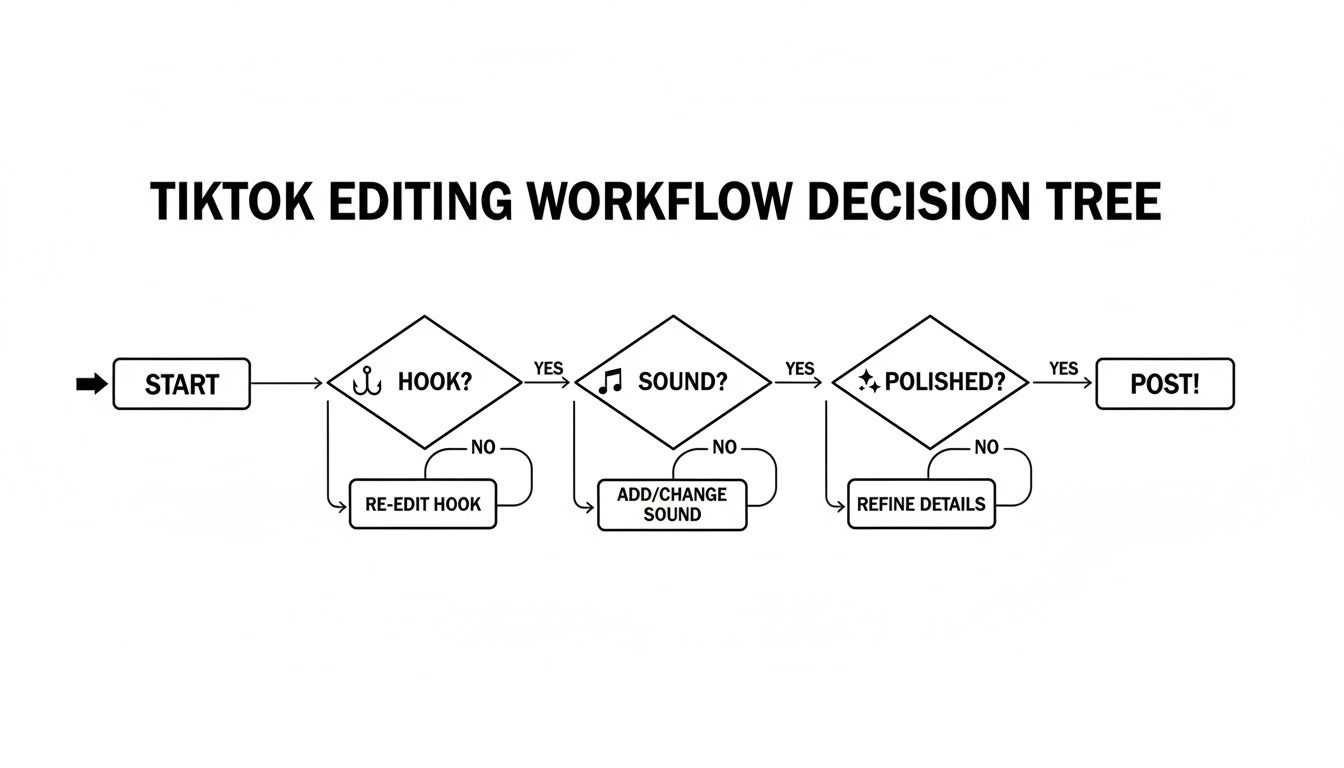
As the chart shows, a great video starts with a solid hook, integrates sound perfectly, and has that final layer of polish—all things the right app can help you nail.
The Monetizing Pro and Brand Manager
When there's money on the line, the requirements change completely. Pros creating sponsored content need a much deeper level of control and precision. We're talking tools for advanced color correction to match a brand's specific look, multi-layer video editing for things like picture-in-picture effects, and keyframe animations to create custom motion graphics.
For brand managers, the scope is even wider, blending creativity with project management. Their ideal setup is often desktop editing software that offers more horsepower, along with cloud-based features for sharing projects and getting feedback from the team. The goal is to find a solution that provides granular creative control and helps maintain a consistent brand identity across dozens of videos.
Matching Your Creator Persona to the Right App Type
To make it even clearer, let's break down which type of app aligns with each creator persona. This table can help you quickly pinpoint the category of software that will serve you best.
| Creator Persona | Primary Goal | Key Features Needed | Recommended App Category |
|---|---|---|---|
| The New Creator | Build consistency and learn the basics of TikTok. | Pre-made templates, simple trimming, easy text/sound integration. | Simple Mobile Apps |
| The Trend Chaser | Quickly produce content to capitalize on viral trends. | Auto-captions, one-click effects, beat-syncing, direct TikTok integration. | Advanced Mobile Apps |
| The Monetizing Pro | Create polished, high-production-value sponsored content. | Advanced color grading, keyframes, multi-layer video editing. | Advanced Desktop Software |
| The Brand Manager | Maintain brand consistency and manage team workflows. | Cloud collaboration, brand kits, project management tools, high-end editing. | Professional/Team-Based Software |
Ultimately, choosing the right app is less about the software itself and more about being honest about your own needs and goals as a creator.
Mobile vs. Desktop Editing for TikTok
One of the first big decisions you'll make as a creator is where you're going to edit your videos. The whole mobile vs. desktop debate isn't about which one is "better" across the board. It’s about which one is better for the specific video you're trying to make right now.
Think of it this way: your smartphone is a speedboat. It's fast, nimble, and perfect for jumping on trends the moment they pop up. Your desktop, on the other hand, is more like a cargo ship—it takes a bit longer to get going, but it can handle much heavier, more complex projects with incredible precision. You wouldn't use a speedboat to haul cargo, and you wouldn't use a cargo ship for a quick joyride.
Knowing which tool to grab for the job is half the battle. For a lot of creators, the best video editing apps for TikTok let them do everything from start to finish right on their phone.
The Case for Mobile Editing
The biggest, most undeniable advantage of editing on your phone is speed. You can literally go from filming a clip to hitting "publish" on TikTok in a few minutes, all on one device. This is absolutely critical for viral trends where a few hours can be the difference between catching the wave and watching it pass you by.
Mobile apps are also built from the ground up for vertical video. The entire interface, all the effects, and the whole user experience are designed for the 9:16 aspect ratio. That means no more awkward cropping or resizing that can really kill your flow on a desktop editor. Plus, you get that seamless, direct pipeline into TikTok’s own sound and effects libraries.
This approach is a perfect fit for:
- Quick, trend-driven videos where getting it out fast is more important than getting it perfect.
- On-the-go vlogging or "day in the life" content you're shooting in bits and pieces.
- Simple edits that lean heavily on what's already popular, like trending TikTok sounds and filters.
The real power of mobile editing is its immediacy. It gets rid of all the friction between having an idea and sharing it, letting you post a video before that spark of inspiration disappears.
When Desktop Editing Reigns Supreme
While mobile is all about speed, desktop editing gives you unmatched power and precision. When you’re putting together a polished piece of sponsored content or a more complicated, story-driven video, you just can't beat the control a big screen with a mouse and keyboard gives you.
Desktop software can chew through high-resolution footage without breaking a sweat, which is a lifesaver if you're shooting in 4K. You get access to features that are either clunky or nonexistent on mobile, like multi-track timelines for layering video and audio, advanced color grading tools, and fine-tuned keyframe animations. It just makes managing big projects with tons of clips and assets so much easier.
Desktop editing is the clear choice when you're working on:
- Brand-safe, sponsored content that needs perfect color correction and precise branding.
- Complex projects that involve multiple video layers, custom graphics, or detailed sound design.
- Batch-producing content, where keeping all your files and assets organized is crucial.
In the end, many of the most successful creators don't pick a side—they use both. A hybrid workflow is often the smartest approach: use your phone for the quick, daily, trend-chasing videos and fire up the desktop for the bigger, pillar content that really defines your channel.
Speed Up Your Workflow with Smarter Tools
If you're serious about growing on TikTok, you know that consistency is king. But keeping up with the platform's relentless pace can feel like a full-time job. The real secret isn't putting in more hours—it's about finding clever ways to streamline your editing process so you can publish more without burning out. It’s all about working smarter, not harder.
The best video editing apps are now packed with features designed to do just that. They take the most repetitive, time-consuming parts of editing off your plate. Think of them as your own personal editing assistant, handling the tedious stuff so you can pour your energy into what really matters: your creative vision.
Ride the Wave with Templates
One of the quickest ways to jump on a trend is to use pre-made templates. Many of the top editing apps have libraries full of them, designed to mimic what’s currently going viral. They often come with the trending audio, effects, and text animations already baked in.
Instead of spending an hour trying to perfectly replicate a popular format, you just drop your clips into a template and you're good to go. This can literally cut your editing time down to a few minutes. When a trend has a shelf life of a day or two, that speed is everything.
Using templates isn't about being unoriginal. It’s about leveraging momentum. You get to skip the boring technical setup and focus on injecting your unique personality into a format that you already know people are watching.
Let AI Do the Heavy Lifting
Beyond templates, artificial intelligence has become a creator's secret weapon. Modern editing apps are moving beyond gimmicks and integrating seriously powerful AI features that automate tasks that used to be a massive headache.
Keep an eye out for apps that offer things like:
- Auto-Captions: Generate subtitles for your entire video in one click. This is a huge win for accessibility and has been shown to improve watch time.
- Smart Scene Detection: Let the AI analyze a long clip and automatically suggest the best moments to cut to, saving you from endlessly scrubbing through raw footage.
- AI Background Removal: Instantly cut yourself out of your background without needing a green screen. It's perfect for creating professional-looking effects on the fly.
These features tackle the grunt work, freeing you up to produce polished, high-quality content faster than ever before.
For creators who want to be a step ahead, tools like Viral.new take things even further. They use AI to analyze what's trending in your specific niche and deliver daily video ideas directly to you.
By pairing AI-powered idea generation with smart editing features, you build a powerful system for creating high-impact content consistently. You spend less time wondering what to make and more time actually making videos that connect with what people on TikTok are excited about right now.
Answering Your Top TikTok Editing Questions
Once you get the hang of creating content, you'll naturally start running into new questions. It's easy to get bogged down trying to figure out all the little details of different apps and techniques, so I've put together some straight answers to the most common questions I hear from creators.
Think of this as your go-to cheat sheet for clearing those small hurdles that can really slow down your creative rhythm. Nail these fundamentals, and you'll find yourself editing with way more speed and confidence.
Do I Need a Paid App to Make Good TikToks?
Nope. Absolutely not. One of the biggest myths I see tripping up new creators is the idea that you have to shell out cash to go viral.
In reality, many of the most powerful and popular editing apps are completely free. They give you everything you actually need—precise trimming tools, sound-syncing features, a huge library of effects, and cool text overlays. Paid versions might add some niche pro features, extra cloud storage, or remove a watermark, but honestly, the best free apps are often watermark-free anyway. For 95% of creators, a solid free app is more than enough to make amazing videos.
A price tag doesn't equal power. The best tool is the one that clicks with your workflow, not the one that costs the most. Get really good with a great free app before you even think about paying for one.
Can I Just Use the Built-In TikTok Editor?
You definitely can, and for those spontaneous, in-the-moment videos, it's a great choice. The built-in editor is perfect for capturing something and getting it posted instantly without ever leaving the app.
But if you're aiming for more polished, professional-looking content, you'll hit its limits pretty fast. Key features that are standard in dedicated editing apps—like layering videos (picture-in-picture), fine-tuning your audio, creating custom movement with keyframes, and making super-precise cuts—are either completely missing or just too basic in TikTok's editor.
Most serious creators land on a hybrid workflow: they do the heavy editing in an external app and then upload to TikTok to add final touches like a trending sound or a popular sticker.
How Do I Edit Videos to Match a Sound's Beat?
This is a game-changer. Editing to the beat makes your videos feel so much more satisfying and native to the platform. The easiest way to do this is with an app that has an "auto-beat" or "beat-sync" feature. These tools literally listen to the audio and drop markers onto your timeline for you, giving you perfect targets for every single cut.
If your app doesn't have that feature, no worries—you can do it manually with markers. It just takes a minute.
- Drop your chosen sound onto the timeline.
- Play the track and use the "Add Marker" function to tap along with the beat as you listen.
- Once all your markers are in place, just trim your video clips so that each cut lands exactly on a marker.
Mastering this technique is key for creating that rhythmic, energetic content that really grabs people's attention. The length of your clips plays a big role here, too. To dive deeper into that, check out our guide on how long a TikTok video should be.
Ready to stop guessing and start creating content that hits the mark every time? Viral.new delivers AI-powered, trend-aligned video ideas directly to you daily, so you can focus on making great TikToks, not brainstorming them. Start getting your daily video ideas today!
