
Most TikTok calendars are built like lists of dates: Monday is educational, Tuesday is a trend, Wednesday is a product video. That approach looks organized, but it breaks the moment a sound takes off, a product launch moves, or your filming capacity shrinks. A useful calendar isn't a stack of daily prompts. It's a decision system for choosing what to publish when trend speed, brand consistency, audience relevance, conversion goals, and production capacity compete.
That matters because short-form video is still a major attention driver. In a 2025–2026 consumer survey, 62% of Americans preferred short-form video over text or long video, while 193 of 336 respondents named it the ad format most likely to earn attention, as reported in TikTok content research from InfluenceFlow. Your calendar should therefore do more than keep you busy. It should help you produce the right kind of video quickly.
The ten content calendar ideas below organize TikTok planning around practical operating decisions. Some protect consistency, some create room for reactive publishing, and others turn one filming session into a wider content engine. Viral.new can support the workflow with daily, niche-specific ideation, but the calendar still needs a human editor who understands the audience, the offer, and the moment.
1. Trend-Stacking Calendar
A trend-stacking calendar combines multiple relevant signals in one video concept. Instead of using a trending sound without a clear idea, pair a sound with a format, a niche conversation, a visual transition, or a timely audience problem. A beauty creator might demonstrate a current makeup technique with a recognizable audio cue and a seasonal angle. A fitness creator could combine a popular transition with a workout format and a question already appearing in comments.
The point isn't to cram every visible trend into one clip. That often produces a video that feels forced and gives viewers no reason to watch beyond the opening second. Stack only signals that support the same idea. A product demonstration can use a trend as the wrapper, but the product benefit must remain understandable without the trend.
TikTok trends have a short shelf life, and TikTok strategy research from Metricool notes that trends can saturate in 2–4 weeks. Build a running library with columns for sound, visual format, hook, niche fit, and expiry risk. Mark each trend as “watch,” “ready,” or “saturated” so you don't spend production time on yesterday's format.
Practical rule: Use a trend to improve the delivery of a useful idea, not to replace the idea.
Create modular scripts that let you change the audio, opening text, or transition without reshooting the entire video. Viral.new's guide to trend analysis can support daily discovery, while your calendar decides which trend belongs to your brand.
2. Pillar and Sprout Content Framework
A stable TikTok presence needs recognizable subjects as well as timely formats. The Pillar and Sprout framework separates those jobs. Pillars express your core expertise, product categories, or recurring customer problems. Sprouts take one of those subjects and give it a current hook, sound, comment prompt, or platform-native format.
A skincare brand might use a pillar for explaining ingredient functions, then create sprouts around a reaction video, a “get ready with me” format, or a timely question about using that ingredient. A consultant can make methodology videos the pillar and turn audience objections into sprouts. This structure keeps the account recognizable without making every post feel like a brochure.
Don't confuse this with a rigid ratio. The right balance depends on how quickly your niche changes and how much production time you have. Batch the evergreen pillar videos when your schedule is calm. Keep sprouts lightweight, so a relevant trend doesn't require a full production meeting.
Make every sprout answer to a pillar
Tag each idea by its underlying business message. “Three ways to style this jacket” might be a fashion sprout, but its pillar could be versatility, product education, or seasonal styling. That tag makes the video easier to repurpose and helps you notice which business topics receive repeated audience interest.
Use this content calendar creation guide to structure fields for the pillar, hook, format, CTA, owner, and status. A useful calendar should show both the publishing date and the reason the video exists.

3. Seasonal and Micro-Moments Calendar
Seasonal planning gives you production certainty. Micro-moment planning keeps that certainty from making your account feel disconnected from what people are discussing today. Build the seasonal layer around launches, holidays, weather changes, events, and buying periods. Then leave deliberate capacity open for unexpected cultural moments, niche news, comment-driven questions, and fast-moving formats.
A fashion retailer can prepare a winter layering series in advance, then respond to a sudden styling conversation with a quicker video. A personal trainer can prepare a New Year routine while leaving room for a workout format that appears during the week. The preplanned video protects the publishing rhythm. The reactive video gives the account a reason to participate in the present.
A practical calendar uses a long-range view for themes and a short-range view for execution. Give each seasonal idea a filming deadline, required props, approval status, and fallback angle. If the original trend disappears, the footage should still work with a different opening or voiceover.
Protect the open space
A calendar with every slot filled isn't flexible. Reserve a portion of your weekly capacity for reactive work, consistent with Metricool's recommendation to plan roughly 70% of TikTok content while leaving 30% for real-time trends in its TikTok strategy guide. Those figures are a planning model, not a requirement. A solo creator may need a larger evergreen buffer, while a news-oriented account may need more room for immediacy.
Review the open slots frequently. If no relevant moment appears, use them for a comment reply, an evergreen variation, or a low-production test instead of forcing a trend.
4. Hook-Forward Content Calendar
Most creators write the video first and add a hook at the end. Reverse that order. A hook-forward calendar begins with the first visual, spoken line, text overlay, or action, then builds the rest of the video around the promise established in the opening.
For a product creator, the hook might show the problem before revealing the solution. For a coach, it could be a direct question that identifies a costly mistake. For a comedian, it might be an abrupt change in setting or sound before the setup. The hook doesn't need to be loud. It needs to create a clear reason to continue.
Audit your strongest videos by examining the first moments, not just the topic. Record whether the opening uses a question, result-first reveal, pattern interrupt, demonstration, confession, or comment response. Store those patterns in a hook library alongside the audience problem they address.
Write backward from the promise
A useful calendar row should include the hook, payoff, proof, and CTA. If the hook promises “a faster way to organize product shots,” the middle needs to show that method, and the ending needs to tell viewers what to do next. A dramatic opening followed by generic advice creates a retention problem and teaches your audience not to trust future hooks.
Test alternate openings for the same core idea, but change one creative variable at a time. The YouTube walkthrough on TikTok content planning can complement this process, especially when you're turning a broad topic into a specific opening.
5. Niche-Audience Segmentation Calendar
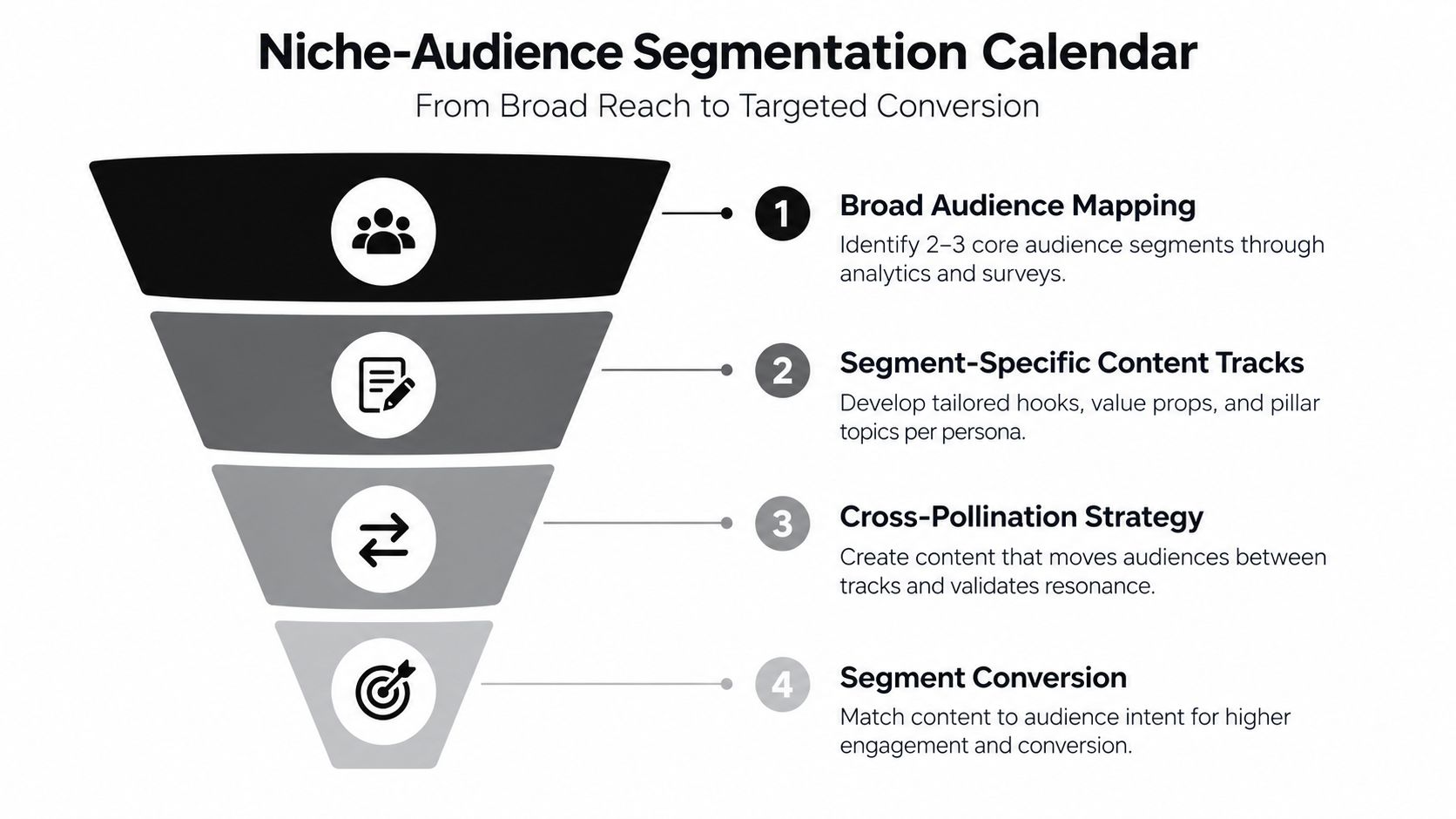
One audience label is rarely enough for a growing TikTok account. A fitness creator may attract beginners, experienced athletes, people considering a purchase, and existing customers. Each group can care about the same subject for a different reason. A segmentation calendar gives those reasons their own content tracks.
Start with observable signals. Read comments, review recurring questions, compare which videos attract buyers versus casual viewers, and note the language each group uses. Keep the segments practical. “People who want quick beginner workouts” is more useful than a broad demographic label because it directly informs the subject, length, demonstration, and CTA.
A software brand might create an awareness track around common workflow problems, a consideration track around comparisons and use cases, and a decision track around implementation. A fashion creator could separate outfit inspiration from fit guidance and purchase advice. The account can still feel coherent because every track serves the same positioning.
Give each segment a distinct job
Don't just repeat one video for different audiences with a changed caption. Change the promise and proof. Beginners may need a simple demonstration and reassurance. Advanced viewers may want a technical breakdown, a constraint, or a challenge.
Keep the segments visible in the calendar with fields for audience, intent, problem, hook, and next action. Viral.new can generate ideas from a specific niche description, but you should describe each audience track separately rather than asking for generic prompts. Comment quality and qualified inquiries often reveal resonance more clearly than raw views.
6. Conversion-Focused Content Calendar
A conversion calendar connects every video to a business outcome without turning every post into an advertisement. Map content to awareness, consideration, or decision. Awareness videos name a problem or create useful recognition. Consideration videos explain a method, compare options, or show evidence. Decision videos answer objections and make the next step clear.
A meal-planning business might publish a problem-focused video about inconsistent dinners, then a walkthrough of its method, followed by a demonstration of the paid service. A local retailer can use educational product comparisons before inviting viewers to visit the store. The sequence matters because a direct sales CTA often feels premature when the audience hasn't understood the problem or the offer.
Use a CTA rotation rather than repeating “buy now.” Ask for a comment when you need audience language, invite a profile visit when the next piece of information lives there, offer a lead magnet when the viewer needs more detail, and send qualified viewers to a product page when the video has already addressed the main objection.
Separate attention from intent
Track whether a video attracted the right person, not only whether it attracted many people. A high-view awareness clip may be valuable even if it produces few clicks. A lower-reach comparison video may be more useful if it produces relevant messages or product visits.
For every conversion-oriented row, record the audience stage, offer, CTA, landing destination, and measurement method. Dotdigital's content calendar guide also emphasizes connecting content planning with goals, audience needs, calls to action, and review cycles. That discipline keeps a calendar from becoming a publishing schedule with no commercial purpose.
7. Collaborative and Creator Partner Calendar
Collaboration works better when it has a place in the operating calendar. Schedule duets, stitches, interviews, creator replies, and co-produced videos as recurring formats rather than waiting for an informal opportunity to appear.
Choose partners for audience overlap and creative compatibility, not follower count alone. A skincare creator may gain more from working with a makeup educator whose viewers ask about skin preparation than from partnering with a large but unrelated lifestyle account. A local restaurant can work with a nearby food creator on a taste test, behind-the-scenes visit, or response to a customer question.
The request should include a specific concept. “Would you like to collaborate?” creates work for the other creator. “Would you test these two menu items while I explain the ingredient difference?” gives them a format, role, and reason to participate.
Use a collaboration ladder
Start with low-friction formats such as a stitch or duet. Move to a shared shoot when the first exchange shows audience and working-style alignment. A recurring series requires more coordination, so define the topic, publishing sequence, approval process, and ownership before filming.
Keep a partner board with contact status, niche fit, proposed idea, delivery date, and reuse permissions. Give collaborators a brief containing the opening, essential talking points, visual requirements, and CTA, while leaving enough freedom for their own voice. The best partner content feels native to both accounts, not like two scripts forced into one frame.
8. Behind-the-Scenes and Authenticity Calendar
Behind-the-scenes content earns its place by showing how the polished result happens. It can document a failed product shoot, a messy editing desk, a fulfillment problem, a coaching preparation session, or the decisions behind a finished piece of work. These videos don't need to compete with highly edited entertainment on every metric. They create context and familiarity.
Schedule authenticity deliberately. Capture short clips while work is already happening rather than staging an elaborate “raw” production. A product business can film packing orders, checking inventory, or fixing a display. A creator can show the first take, the mistake that changed the script, or the process of choosing a hook.
Keep the story, not just the footage
Unedited footage isn't automatically authentic. Give each behind-the-scenes video a small narrative: what was supposed to happen, what changed, and what the viewer can learn. A failed makeup look becomes useful when the creator explains the technique that caused the problem. A delayed shipment becomes meaningful when the brand shows how it handled the customer communication.
Store recurring BTS categories such as workspace, process, failure, learning, milestone, and personal routine. Pair process footage with a relevant sound or text hook when appropriate, but don't disguise the context so heavily that viewers can't tell what they're seeing. Comments, direct messages, and returning viewers can reveal the value of this content even when its reach is less dramatic.
9. Testing and Iteration Framework Calendar
A testing calendar turns experimentation into a controlled workflow. Reserve regular space for questions such as whether a result-first opening beats a question, whether a tutorial beats a comparison, or whether a new audience segment understands the offer. The important part is not testing everything. It's defining the variable before you publish.
Write a hypothesis in plain language: “A direct demonstration will create more qualified comments than a verbal explanation.” Keep the topic and offer stable, then change the opening or format. If you change the hook, sound, topic, length, and CTA together, the result won't tell you what caused the difference.
Maintain a testing log
Record the video, hypothesis, variable, audience, result, and decision. Use platform-native signals such as watch behavior, comments, profile actions, and link activity according to the goal of the test. Don't treat a single weak result as a permanent verdict. A format may fail because the topic was wrong, the opening was unclear, or the execution didn't match viewer expectations.
A testing slot also protects creative range. Without it, creators often repeat familiar formats until the account becomes predictable. Keep promising results in a “proven patterns” library and convert them into future pillar or sprout ideas. Use daily prompts from Viral.new as inputs for tests, not as instructions to publish every idea unchanged.
10. Repurposing and Content Multiplication Calendar
Repurposing starts during filming, not after a TikTok underperforms. Choose a core idea, then capture the footage needed for multiple edits, openings, crops, explanations, and platforms. A product demonstration can produce a fast reveal, a detailed walkthrough, an objection response, and a short clip focused on one feature. The message stays connected while the viewer experience changes.
Create a repurposing matrix for each content type. For an interview, list the main TikTok, short quotes, a problem-specific clip, a longer explanation, an email angle, and a website excerpt. For a tutorial, capture the full process, individual steps, common mistakes, and a result-first version.
Film for the derivatives
Shoot clean master footage, but also capture close-ups, alternate angles, pauses, screen recordings, and standalone lines. Leave enough space around the subject for different crops and add captions that make sense without the original context. Don't publish every derivative at once. Stagger releases so the same idea has time to reach different viewers and so your own audience doesn't feel trapped in one message.
Use clear file names and tags for topic, audience, hook, platform, and status. Viral.new's content repurposing strategies can help connect a core idea to additional formats, while the calendar should control which derivative goes live and why.

10-Point Content Calendar Comparison
| Strategy | Implementation complexity 🔄 | Resource requirements ⚡ | Expected outcomes 📊⭐ | Ideal use cases 💡 | Key advantages ⭐ |
|---|---|---|---|---|---|
| Trend-Stacking Calendar | High, continuous trend monitoring and rapid execution | Moderate, trend tools + fast editing workflows | High reach & viral potential by hitting multiple algorithm signals 📊⭐ | Solo creators, e-commerce, niche builders | Maximizes algorithmic visibility; efficient multi-trend capture |
| Pillar + Sprout Content Framework | Medium, upfront pillar definition and ongoing sprout planning | Moderate, monthly batching for pillars + quick sprouts | Balanced long-term authority and short-term engagement 📊⭐ | Small businesses, product-focused creators, marketing teams | Protects brand messaging while allowing trend agility |
| Seasonal + Micro-Moments Calendar | High, dual timelines (8-week season + daily micro-moments) | High, pre-production for tentpoles + reserve capacity for micro-moments ⚡ | Predictable seasonal performance with opportunistic viral wins 📊⭐ | E-commerce, seasonal businesses, marketing agencies | Prevents seasonal panic and maintains real-time responsiveness |
| Hook-Forward Content Calendar | Medium, requires hook testing and reverse-engineering concepts | Low–Moderate, focus on hook libraries and quick edits | Improves retention and watch time; reduces wasted production 📊⭐ | Growth-focused creators, entertainment, DTC brands | Maximizes first-3s retention; speeds ideation and briefs |
| Niche-Audience Segmentation Calendar | High, audience research and multiple content tracks | High, increased production volume and advanced analytics | Higher relevance and conversion within defined segments 📊⭐ | E-commerce, coaches, personal brands with diverse audiences | Better targeting and A/B testing; reduces misaligned content |
| Conversion-Focused Content Calendar | Medium–High, maps content to customer journey and CTAs | Moderate–High, tracking, UTM/link management, CRO tools ⚡ | Direct revenue impact and clearer ROI measurement 📊⭐ | E-commerce, service providers, startups focused on growth | Aligns content to business outcomes; measurable performance |
| Collaborative + Creator Partner Calendar | Medium, partner coordination and scheduling | Moderate, outreach, briefs, co-production time | Expanded reach and cross-pollination of audiences 📊⭐ | Growth-stage creators, community-focused, niche creators | Reduces solo workload; fresh perspectives and audience growth |
| Behind-the-Scenes + Authenticity Calendar | Low, regular capture of raw/personal footage | Low, phone camera, minimal production, time for storytelling | Deeper audience connection, higher comment/loyalty metrics 📊⭐ | Personal brands, service providers, solo creators | Builds trust and long-term loyalty through authenticity |
| Testing + Iteration Framework Calendar | Medium, disciplined single-variable tests and documentation | Moderate, analytics, test logging, time for analysis ⚡ | Continuous optimization and discovery of new winning formats 📊⭐ | Growth-focused creators, data-driven teams, agencies | Systematic learning; prevents creative stagnation |
| Repurposing + Content Multiplication Calendar | Medium, upfront modular planning and repurpose matrix | Moderate, multi-format editing skills and scheduling | Maximizes ROI per asset; multi-platform presence 📊⭐ | Time-constrained creators, small teams, multi-platform brands | Turns one shoot into many assets; reduces ideation burden |
Build a Calendar That Can Keep Up
Choose your starting framework by identifying the constraint that currently causes the most damage. If your niche changes quickly, start with Trend-Stacking or Seasonal and Micro-Moments planning. If your account feels inconsistent, use Pillar and Sprout. If videos get views but attract the wrong people, build a Niche-Audience Segmentation calendar. If attention rarely becomes business activity, use the Conversion-Focused framework.
Your production reality matters just as much. A creator with limited filming time should start with Repurposing and Content Multiplication. A personal brand that looks too polished can add the Behind-the-Scenes and Authenticity track. A creator who keeps repeating the same formats should reserve calendar space for Testing and Iteration. If relationships and audience expansion are central to the strategy, schedule collaboration rather than treating it as an occasional bonus.
Don't adopt all ten systems at once. Combine one core framework with one flexible layer. Pillar and Sprout plus Testing is a strong starting combination because it protects the brand message while creating a regular place for new hooks and formats. Seasonal and Micro-Moments plus Repurposing works well for a product business that needs advance preparation without wasting footage.
Turn the chosen system into a weekly shoot-and-publish routine. At the start of the week, review comments, trend signals, business priorities, and open calendar slots. During filming, batch the pillar or core content and capture extra footage for derivatives. Before publishing, confirm the hook, audience, CTA, status, and fallback version. After publishing, log what viewers responded to and use that evidence to adjust the next batch.
A content calendar should make decisions easier, not create another administrative burden. Keep only the fields your team uses, such as date, audience, pillar, hook, format, CTA, asset link, status, and result. If the calendar becomes harder to maintain than the content itself, simplify it.
Viral.new can help maintain a steady pipeline of niche-relevant TikTok prompts, especially when you need fresh trend angles without abandoning your content pillars. It can suggest directions, but you still own the final editorial judgment. That judgment is what keeps a trend useful, a CTA credible, and a publishing system connected to the people you want to reach.
Viral.new delivers fresh, trend-aligned TikTok video prompts to your inbox each morning, crafted to your niche, audience intent, seasonal context, and current formats. Use it to fill trend-response, testing, and sprout slots in your content calendar, then visit Viral.new to start building a more consistent idea pipeline.
