
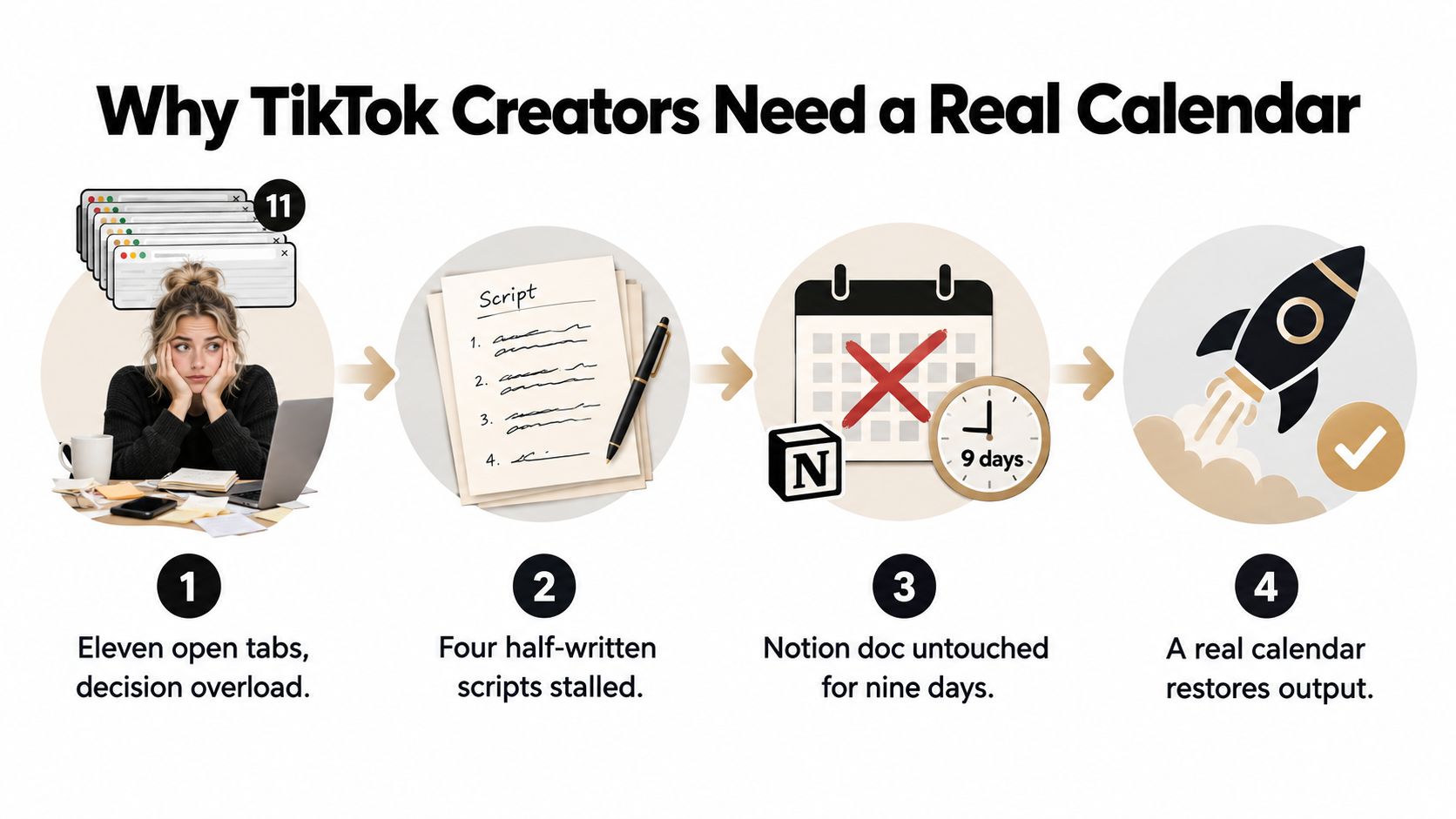
You have eleven browser tabs open, four half-written TikTok scripts, and a Notion content calendar you last touched nine days ago. A client asks what's publishing this week, and the honest answer is buried somewhere between a saved sound, an unfinished product demo, and an idea that already feels dated.
That's rarely a filming problem. It's a decision problem. Effective content calendar creation turns scattered ideas into a production system by deciding which content pillar each video serves, what hook it needs, and when it should ship. For TikTok, the system must also leave room for what wasn't predictable when you planned it.
A practical model is to plan roughly 70% of your TikTok output in advance and reserve 30% for real-time trend participation, a hybrid structure recommended in Metricool's TikTok strategy guidance. Planned slots protect quality and brand consistency. Flex slots let you react when a sound, format, or cultural moment gives you a timely opening.
Why TikTok Creators Need a Real Calendar
A real calendar is more than a list of posting dates. It's a decision pipeline that moves an idea from concept to published video without forcing you to rethink the same choices every morning.
A solo founder might start Monday with a product tutorial, a customer question, and a trending sound saved in TikTok. Without a system, all three compete for attention. By Wednesday, the tutorial is still unscripted, the question has lost urgency, and the sound no longer fits the conversation. The creator hasn't failed to generate ideas. They've failed to decide what ships first.
Turn creative choices into operating rules
Every calendar entry should answer a few basic questions before production begins:
- Purpose: Is the video designed for discovery, nurturing, community, or conversion?
- Pillar: Which recurring subject does it belong to?
- Hook: What earns attention in the opening moment?
- Format: Is it a tutorial, response, demonstration, story, POV, or remix?
- Owner: Who writes, films, edits, approves, and publishes it?
- Status: Is it an idea, script, filmed asset, edit, approved post, or published video?
That information removes friction during busy weeks. A client handover becomes easier because the next action is visible. A creative slump becomes less dangerous because the team can choose from approved ideas rather than starting from an empty page.
Use the calendar without becoming its servant
Rigid planning creates one kind of failure. A team may lock every slot weeks ahead, then ignore a relevant sound because the schedule has no room for it. Pure trend chasing creates another. The feed becomes inconsistent, sales content gets postponed, and the brand starts borrowing formats without building recognition.
The hybrid structure solves the trade-off. Planned posts carry the account's recurring promises, while open slots create capacity for fast-moving opportunities. The calendar remains the single source of truth, but it includes a deliberate area for content that can't be known in advance.
Practical rule: If the calendar doesn't show both what must ship and what may change, it isn't managing risk. It's only displaying intentions.
Define Your Content Pillars and Goals
Start with the account's promise, not with a list of random topics. Content pillars are the recurring subject areas viewers can recognize before they read the username, and each one should have a clear job connected to a business outcome.
Keep the initial set narrow. Three to five pillars are usually enough to create variety without turning the calendar into a collection of unrelated channels. A pillar that can't produce a healthy list of distinct video ideas during a short brainstorming session is probably too narrow, too vague, or not important enough to keep.
Give every pillar a job
A solo creator teaching design might use:
- Quick tutorials: Build authority through practical instruction and encourage saves.
- Behind the build: Show decisions, experiments, and mistakes that create familiarity.
- Contrarian takes: Challenge common advice and create discussion-led discovery.
A DTC brand needs a different mix. Its pillars might include problem-agitate-solve videos, founder stories, user-generated content remixes, and product demonstrations. A local business could focus on seasonal customer needs, answers to recurring questions, staff personality, and offers tied to real visits.
The labels matter less than the job description. “Product content” is too broad to guide production. “Demonstrate one use case, remove one objection, and direct qualified viewers to the product page” gives a creator something concrete to script.
Map pillars to outcomes
Create a simple planning record for each pillar:
- Name the topic clearly.
- Write its business role in one sentence.
- List repeatable formats.
- Assign the metric that helps you judge it.
- Add example hooks or audience questions.
A tutorial pillar may influence saves and follows. A founder story may support profile visits and community response. A product pillar may be judged by clicks or direct messages rather than raw views.
| Account Type | Pillar 1 | Pillar 2 | Pillar 3 | Pillar 4 |
|---|---|---|---|---|
| Solo creator | Quick tutorial | Behind the build | Contrarian take | Community response |
| DTC brand | Problem-agitate-solve | Founder story | UGC remix | Product close |
| Local business | Customer questions | Seasonal demand | Staff personality | Local offer |
Let the audience shape the map
Your comments, support messages, sales conversations, and customer objections are useful sources for pillar decisions. If people repeatedly ask how to choose, install, compare, or use something, that question can become a recurring instructional series. If customers respond to staff stories, personality deserves a planned place rather than an occasional improvisation.
A pillar should make future calendar entries easier to defend. When an idea has a clear audience need, a recognizable format, and a measurable role, it's less likely to die in the planning document.
Set a Cadence That Matches the Algorithm
A calendar can look efficient on Monday and collapse by Thursday. TikTok-specific guidance commonly points to three to five posts per week, while SocialRails' content-calendar guidance cites 95% publishing consistency, a 3% to 6% engagement target, and 15% to 25% monthly growth as reference benchmarks. Use those figures as planning context, not universal promises. Your available filming, editing, approval, and publishing time sets the sustainable cadence.
A hybrid schedule works better than a fully rigid one. Plan roughly 70% of slots ahead so production stays predictable, and leave about 30% open for trend-reactive videos, timely replies, or ideas that emerge from current viewer behavior. A lower but dependable schedule usually creates better learning conditions than a higher target that repeatedly slips.
Choose the operating range
Three posts per week gives a creator room for research, client work, and production outside TikTok. Five posts create more chances to test topics and formats, but demand tighter batching, faster approvals, and a reliable asset pipeline.
Set the target around the week you can run:
- Three posts: One filming block can often cover the planned content when scripts and props are ready. Keep one slot flexible when possible.
- Four posts: Add a second content type or a deliberate response slot, while protecting time for editing and review.
- Five posts: Reserve separate time for scripting, filming, editing, and approvals. Leave two slots available for timely ideas rather than filling every slot in advance.
- More than five: Treat the increase as a production change. It may require more people, faster decisions, or simpler formats.
TikTok content typically keeps working for about 10 days per piece, which supports a rapid production rhythm rather than a calendar reviewed only once a month. A video may continue gathering views after publication, but the next schedule should still respond quickly to comments, retention patterns, and emerging trends.
Measure reliability before increasing volume
Track what ships, not just what the calendar promises. If three planned posts repeatedly become two, find the bottleneck in scripting, filming, editing, feedback, or publishing before adding more work. The open portion of the calendar should absorb useful opportunities without forcing the team to abandon committed posts.
| Posts/Week | On-Time Target | Avg Lifespan | Shoot Blocks Needed | Scripting Time |
|---|---|---|---|---|
| 3 | 95% on-time, one buffer slot | About 10 days | One focused block | One planning session |
| 4 | 95% on-time, one to two flex slots | About 10 days | One to two blocks | One to two sessions |
| 5 | 95% on-time, two buffer slots | About 10 days | Two focused blocks | A dedicated scripting block |
These benchmarks describe planning reliability, not guaranteed reach. If the schedule feels fragile, reduce production complexity first. Reuse a camera setup, simplify transitions, and standardize captions before increasing output.
Structure Your Calendar as a Two-Week Lock and Four-Week Plan
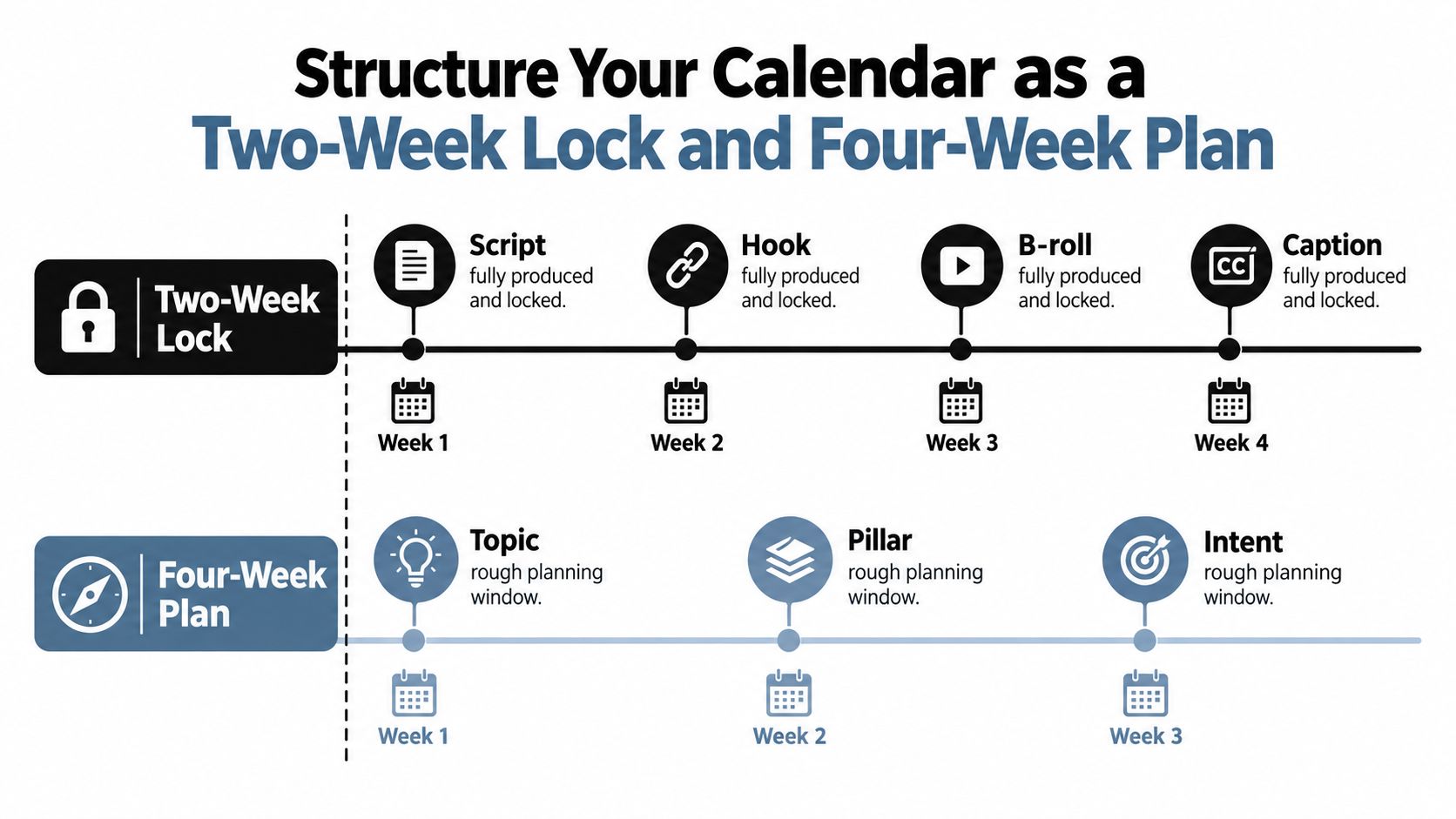
A useful TikTok calendar has two planning speeds. The first is a two-week lock, where every production detail is ready. The second is a four-week forward plan, where you record the topic, pillar, intent, and likely format without pretending that every future trend is knowable.
The locked window should contain scripts, hooks, B-roll notes, captions, owners, approval status, and publishing dates. The forward window should stay light enough to change without creating unnecessary rework.
Run a short weekly review
Use a Monday standup to inspect the forward plan. Ask:
- Which ideas still support the account's current goals?
- Which topics became less relevant?
- Where is the pillar mix unbalanced?
- Which launch, event, or customer question needs a slot?
- Is the flex capacity still available?
Keep one weekly slot intentionally unassigned until the review. It can support a trend response, a timely comment reply, a product update, or a sudden campaign need. An empty cell is not a planning failure. It's production capacity reserved for information you don't have yet.
For teams that need more structured handoffs, a dedicated social media content planning tool can keep ideas, owners, statuses, and assets visible in one workflow. The tool matters less than the operating rule: no private direct-message approvals and no invisible ownership.
Set override rules before emotions take over
Your flex slot needs a decision rule, not a vague instruction to “post something trending.” Check whether the trend fits the audience, the brand's tone, and the available production time. A sound may be popular, but if it requires a performance style your account can't deliver credibly, it isn't automatically a useful opportunity.
For high-volume production, tools that help teams create studio-quality videos fast can reduce the time between deciding to react and having a usable asset. That only helps when the calendar has already defined who can approve the change and which planned post moves to the next available slot.
Keep the two-week window executable and the four-week window editable. Confusing those layers is how calendars become either stale or exhausting.
Build a Batching Workflow That Ships
A weekly TikTok cycle breaks down when every post starts from a blank page. Daily creation sounds responsive, but it makes each morning a fresh negotiation with your attention. You choose a topic, write a hook, set up the camera, find a sound, film, edit, caption, publish, and repeat before the previous post has produced useful feedback.
Batching moves the expensive decisions into focused sessions. A practical system plans roughly 70% of the calendar ahead and keeps 30% open for trend-reactive work. Scripts, shot lists, and production details are prepared early, while the open capacity protects the account from feeling disconnected from TikTok's fast-moving culture. Once the planned assets are ready, publishing becomes more mechanical.
Design the weekly production cycle
A batch can fit into roughly four hours:
- Scripting: Spend 60 minutes turning pillar ideas into clear hooks and short outlines.
- Filming: Use 45 minutes to record three to five videos in one setup.
- Editing: Allocate 45 minutes to template-driven cuts, captions, and framing.
- Captions and hooks: Use 30 minutes to write supporting text for each video.
- Calendar loading: Reserve 30 minutes for uploads, status updates, and slotting.
| Factor | Batching, 1 to 2 times weekly | Daily Production |
|---|---|---|
| Creative decisions | Concentrated in planned sessions | Repeated every day |
| Filming | One setup supports multiple videos | Frequent setup and teardown |
| Hooks | Developed against the pillar map | Often written under deadline |
| Sounds | Chosen from a tagged library | Searched for during production |
| Publishing | Queue can be prepared ahead | Each post requires fresh admin |
| Trend response | Uses reserved flex capacity | Naturally reactive, but disruptive |
The trade-off is clear. Batching protects consistency and reduces setup time, but a rigid queue can miss a relevant sound or audience question. Keep the planned majority ready to publish, then use the open portion for responses that need faster judgment.
A hook swipe file keeps proven structures available without copying another creator's wording. Tag sounds by trend window so the team can separate evergreen audio from formats that need same-day attention. Reusable caption templates preserve stable brand context while leaving room for each post's specific point.
Match tools to the workflow
Native TikTok scheduling can handle queueing for business accounts. Notion, Trello, and Later become more useful when several people review drafts, approve assets, manage multiple channels, or repurpose one shoot across platforms.
Record whether each post is earning its production cost. A framework for measuring ROI of content automation helps connect time saved with business outcomes instead of celebrating output alone. For a closer explanation of what content batching involves, use the batching model as a guide for assigning work and setting handoffs.
The best workflow makes the next approved video obvious while preserving human judgment for trend selection, brand voice, and audience response.
Balance Evergreen, Trend-Reactive, and Sales Slots
A TikTok calendar that only chases trends becomes difficult to recognize. A calendar that only publishes evergreen explainers may stay coherent while missing timely discovery opportunities. The stronger system treats evergreen, trend-reactive, and sales content as different jobs, not as competing versions of the same post.
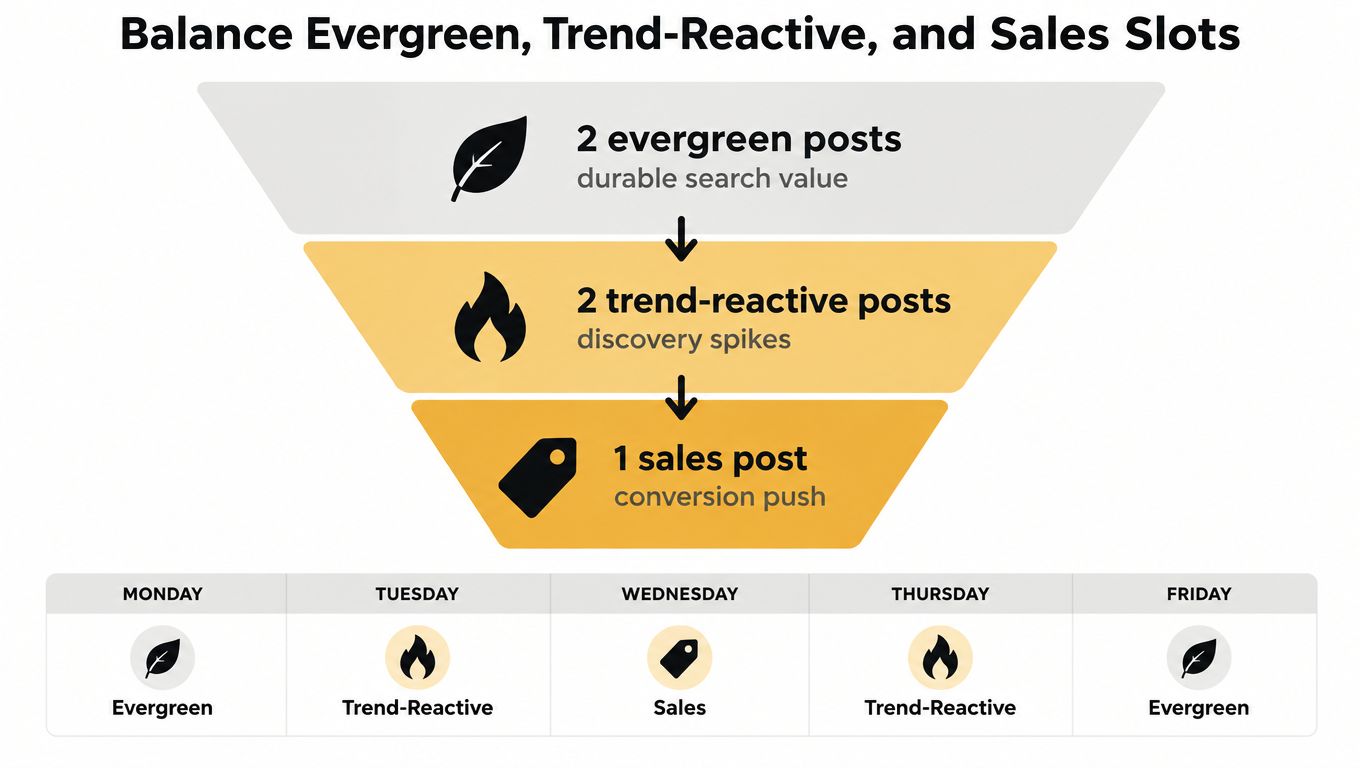
For a five-post week, one practical allocation is two evergreen posts, two trend-reactive posts, and one sales post. That split supports durable authority, current discovery, and commercial intent without asking every video to perform all three functions.
Give each slot a distinct role
Evergreen posts answer recurring questions, demonstrate a repeatable process, or explain a problem people will continue searching for. They're useful for authority and saves, and they give the account a stable base when no trend fits.
Trend-reactive posts adapt a current sound, format, comment pattern, or cultural moment to the account's subject. The trend is the delivery mechanism, not the entire idea. A good reactive post still makes sense for the audience and points back to a recognizable pillar.
Sales posts demonstrate the product, address an objection, show proof, explain an offer, or invite a direct next step. They shouldn't be hidden because they're commercial. Viewers are more likely to accept a clear pitch when the surrounding content has been useful and relevant.
Build for discovery, nurturing, and conversion
Think of the weekly mix as a simple funnel:
- Discovery: Use trend-reactive formats and strong opening hooks to reach people outside the existing audience.
- Nurturing: Use tutorials, POVs, customer answers, and stories to build understanding and trust.
- Conversion: Use demonstrations, comparisons, proof, and direct calls to action.
A DTC brand might use an evergreen “how to use it” video early in the week, a reactive creator-style format in the middle, and a product demonstration near the end. A local business might replace the product demonstration with a seasonal offer or a behind-the-scenes visit prompt.
Review the mix regularly rather than letting one pillar dominate by accident. Guidance from TikTok's 2025 trend report emphasizes creative participation and brand adaptation around emerging cultural moments, which reinforces the need for a calendar that can flex without losing its underlying story.
For practical trend research, use a repeatable process such as this guide to trend analysis. The important question isn't whether a sound is popular. It's whether the sound gives your audience a stronger reason to watch, understand, or act.
Track Performance and Recalibrate Every 90 Days
A calendar only improves when published work feeds the next planning decision. Every Monday, reconcile what was scheduled with what shipped, then record performance beside the pillar, format, hook style, and slot type. That turns analytics into production guidance instead of a monthly report no one uses.
Track the metrics that help you diagnose the video:
- View-through rate: Shows whether the opening and structure hold attention.
- Average watch time: Helps compare how thoroughly viewers consume different formats.
- Shares: Signals that the idea has enough relevance to pass between people.
- Profile visits: Connects discovery content with stronger interest.
- Follower change: Shows whether the account is building an ongoing audience.
- Clicks or direct messages: Helps evaluate commercial intent where those actions are available.
Use weekly reconciliation for decisions
Don't delete a weak video just because it underperformed. Compare it with the normal result for its pillar and slot type. A post that trails its pillar average by more than 20% is a candidate for a hook rewrite rather than immediate removal, as recommended in the operating guidance from Metricool.
Look for patterns across several posts. If tutorials hold attention but produce few profile visits, the issue may be the transition or call to action. If trend posts bring visits but no meaningful next step, the profile and pinned content may not support the promise made in the video.
Recalibrate on a 90-day cycle
Use a staged review rather than changing everything after one disappointing post:
- Day 30: Check whether the pillar mix still reflects business goals and audience questions.
- Day 60: Test one new format, hook pattern, or storytelling approach.
- Day 90: Remove the weakest recurring pillar or slot type and give that capacity to a stronger opportunity.
A clear pruning rule prevents personal attachment from keeping weak formats alive. Retire any format that has run for eight weeks without exceeding the account's median view count, unless it serves an important conversion or community purpose that views don't capture.
The commercial review deserves equal attention. Content planning guidance often separates awareness from action, and pre-sell page conversion insights can help when your TikTok content sends people into a longer decision path. Don't optimize only for reach if the account exists to generate qualified conversations or sales.
| Metric | Why It Matters | Target Benchmark |
|---|---|---|
| View-through rate | Evaluates retention through the video | Compare by format and pillar |
| Average watch time | Shows depth of consumption | Compare against similar video lengths |
| Shares | Indicates pass-along relevance | Look for repeatable themes |
| Profile visits | Measures interest beyond the post | Compare discovery formats |
| Follower change | Tracks audience growth quality | Review by pillar and hook |
| Clicks or DMs | Connects content with intent | Judge against the business goal |
The calendar should change when the evidence changes. If an account discovers that product demonstrations generate more meaningful action than educational explainers, reallocate capacity after the review rather than preserving the old mix because it looked balanced on paper. The point of content calendar creation isn't to defend a plan. It's to make better decisions with every production cycle.
Viral.new delivers fresh, trend-aligned TikTok video prompts to your inbox each morning, customized to your business, audience intent, seasonal momentum, and current formats. Use Viral.new to keep your flex slots supplied with ready-to-shoot ideas while your calendar protects the planned work that needs to ship.
