
If you're looking for a quick, at-a-glance measure of a video's popularity, just look at its thumbnail on any creator's profile. That little number in the bottom-left corner with the play icon is your first clue to a video's reach.
But to really understand what's going on with your content, you'll need to dig deeper. For that, you absolutely must switch to a Creator or Business Account to unlock the full analytics dashboard.
Finding Your TikTok View Counts Fast
Getting a handle on your TikTok views is the first real step to making content that people actually want to watch. That number on the thumbnail is great for instant feedback, but there are several other view metrics hidden around the app. Each one tells a slightly different story about how your videos are performing.
Knowing where to find each of these numbers not only saves you a ton of time but also helps you piece together the full puzzle of your content's impact.
The easiest metric to spot is the individual view count on a video—everyone can see that. But your own profile holds much more valuable data that's private to you. This is where you move past just counting views and start making smart decisions about your next video.
Where Different View Metrics Live
To really track your growth, you need to know exactly where to look for each piece of data. Some stats are public, while others are tucked away in your Creator tools.
Here’s a quick breakdown of the main ones:
- Individual Video Views: You'll find this right on the video thumbnail in any profile grid. It's the most straightforward measure of how many people a video has reached.
- Total Profile Views: This is a private metric you can find in your Analytics. It tells you how many people have actually visited your profile page in the last 7 or 28 days.
- Detailed Video Analytics: This is where the magic happens. Tap into a specific video's analytics to see total watch time, average watch time, and traffic sources. This data shows how viewers are finding you and what’s keeping them hooked.
The image below shows the most common way you'll see view counts—right on a creator's profile page.

This immediate, public feedback is what makes TikTok so addictive and dynamic. It lets you see in real-time what's working and what's not. Getting comfortable finding these basic numbers is the starting point for building any real growth strategy on the platform.
For a handy reference, I've put together a table summarizing where to find the most important view metrics.
Where to Find Key TikTok View Metrics
| Metric You Need | Where to Find It | What It Reveals |
|---|---|---|
| Individual Video Views | Bottom-left of any video thumbnail on a profile grid. | The video's immediate reach and initial popularity. |
| Total Profile Views | Analytics > Overview Tab (Creator/Business Account only). | How many people are interested enough to visit your page. |
| Average Watch Time | Select a video > More data > Performance. | How long, on average, people watch your video. Key for algorithm success. |
| Traffic Sources | Select a video > More data > Viewers. | How people are discovering your content (For You Page, profile, search, etc.). |
Keep this table in mind as you start navigating your analytics. Knowing what each number means and where to find it is half the battle.
Checking Views on Your Own Videos
Want to know how your latest video is doing? Your profile is the first place you should look. It gives you the most immediate feedback on how your content is performing right out of the gate.
Whether you're on your phone or on a desktop, the process is pretty much the same. Think of your profile grid as your personal command center, where every video you've posted has its view count displayed for a quick performance check.
Finding Views on Your Profile Grid
TikTok makes this super easy—the view count is right there on the video thumbnail, so you can see how things are going at a glance.
Here’s how to find it:
- First, head to your profile. In the app, just tap the Profile icon in the bottom-right. On a desktop, you'll click your profile picture in the top-right and hit "View profile."
- You'll see the grid of all your videos. Just look at the bottom-left corner of any thumbnail.
- That number next to the little play icon? That's your total view count for that video.
This number updates in real-time and anyone who visits your profile can see it. It's the quickest way to see which of your videos are grabbing people's attention and which ones are falling flat.
Let's say you post three videos this week. One jumps to 10,000 views, but the other two are stuck around 900. That’s your audience telling you something loud and clear. It’s a huge clue that the topic or style of that successful video is what you should be making more of.
What That View Count Really Means
That number isn't just for show; it's a direct signal of how far TikTok is pushing your video. A "view" is counted the second your video starts playing on someone's screen—they don't even have to watch the whole thing.
This immediate feedback is incredibly valuable. If a video starts racking up views quickly, you know it's hitting the For You Page and resonating. On the other hand, if the view count stalls, it's a sign that the first few seconds aren't hooking viewers. I always use these initial numbers as a quick check to see which videos have the potential to be winners right after I post.
Unlocking Your Full Potential with TikTok Analytics
Okay, so you've moved past just glancing at the view count on your profile. That's the first step from being a casual poster to becoming a strategic creator. If you really want to understand what's working (and what's not), you need to dive into TikTok's analytics dashboard. To do that, you'll need to switch your account to a Creator or Business profile. Don't worry, it's free and absolutely essential for anyone serious about growing on the platform.
Think of this dashboard as your mission control. It gives you a much richer story about how your videos are performing, not just how many eyeballs they caught. When you start analyzing this data, you can stop guessing and start making informed decisions that lead to real, sustainable growth.
Making the Switch to a Creator Account
First things first, you can't get to the good stuff until you enable Creator Tools. The process is straightforward and opens up a whole world of features designed to help you get inside your audience's head and fine-tune your content.
Here’s how to do it:
- Head over to your Profile page in the TikTok app.
- Tap the three horizontal lines (the "hamburger menu") in the top-right corner to open up Settings and privacy.
- Choose Account, and then tap on Switch to Business Account. TikTok will then walk you through a couple of quick prompts to pick a category that best describes you and your content.
Once you’ve done that, a "Creator tools" or "Business suite" option will magically appear in your settings. This is your new gateway to all your performance data.
Decoding Your Analytics Dashboard
The analytics dashboard is where the magic happens. It's where you'll find the answers to all those burning questions about your content. The data is neatly broken down into tabs like Overview, Content, and Followers, and each one offers a different piece of the puzzle. You'll see total video views over specific periods (7, 28, or 60 days), profile views, and a clear chart of your follower growth trends.
Getting a handle on this data is about more than just vanity metrics. It’s your ticket to effectively reaching an audience on a platform that's projected to hit 1.94 billion adult users by July 2025. Once you hit 1,000 followers, you can unlock even more powerful data by going to your Profile, tapping the three dots, selecting Creator Tools, and then Analytics. This is where you find the really juicy stuff, like average watch time and detailed follower demographics.
The basic path to checking your views on any given video is pretty simple, as you can see here.
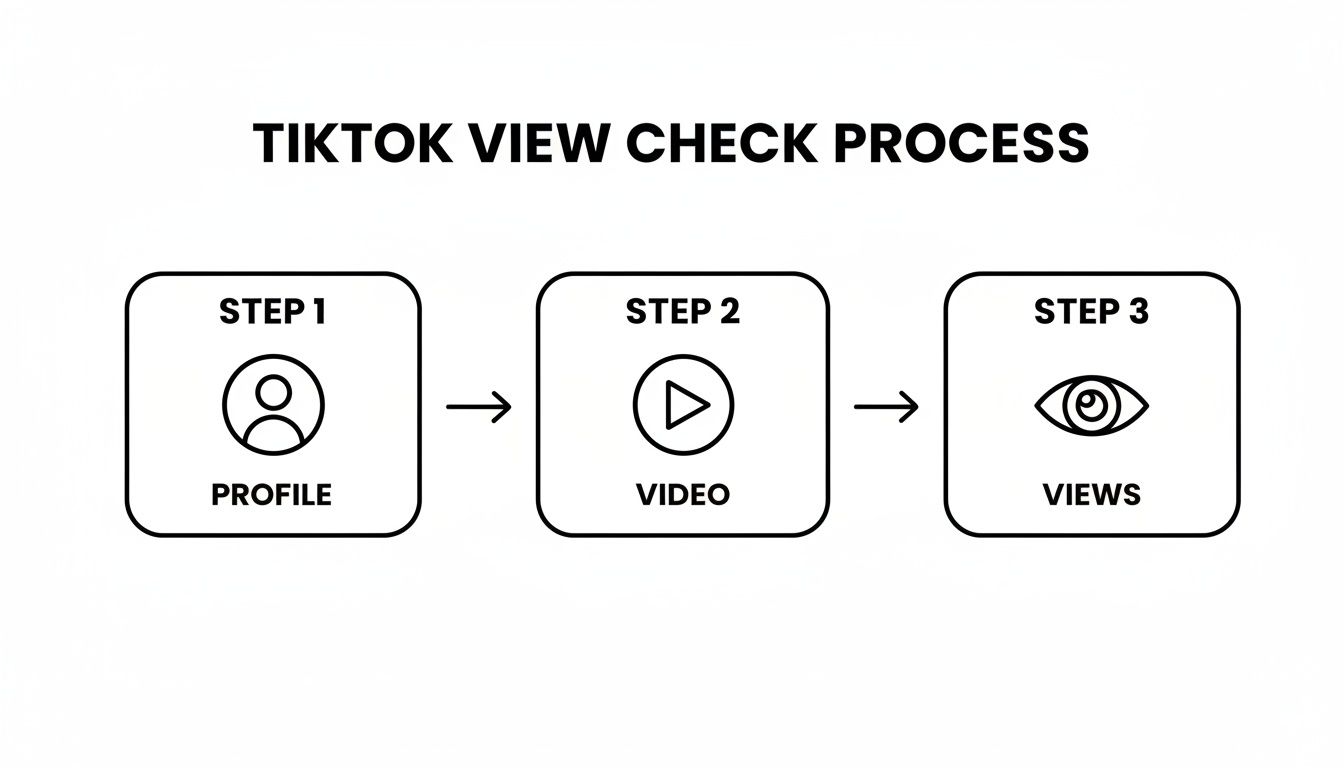
While that shows the basic journey, the real power comes from digging into the Analytics you've just unlocked.
Here's a real-world example: A small business owner I know was checking their 'Audience Territories' data and discovered that a surprising 30% of their viewers were from a neighboring city. They used that insight to run a super-targeted local ad campaign, turning all those passive viewers into actual paying customers.
Going beyond just checking views is how you truly master social media analytics and reporting and turn it into a game-changer for your strategy. For instance, take a look at your Traffic Sources. Are your views coming from the For You Page, your profile, or your existing followers? A ton of FYP traffic means your content has broad appeal and is landing well with new audiences. If you want to really learn how to turn these numbers into a solid plan, our guide on http://viral.new/blog/video-analytics-tiktok can show you how to connect the dots.
Turning Your Analytics into a Growth Strategy
https://www.youtube.com/embed/QKMh2ca1wjc
Knowing how to check your TikTok views is one thing. Actually using that data to grow your account? That’s where the real magic happens. Your analytics dashboard isn't just a report card on past videos; it’s a crystal ball showing you exactly what your audience wants more of.
When you start digging into your performance data, you can finally stop the guesswork. No more throwing content at the wall to see what sticks. Every metric, from average watch time to where your traffic came from, is a breadcrumb leading you toward your next great video idea.
Interpreting Your Key Performance Metrics
The biggest insights come from connecting the dots between different numbers. A high view count is a great start, but it rarely tells the full story. You have to look a little deeper to understand the why behind a video's performance.
Let's break down a few common scenarios I see all the time:
- High Views, Low Watch Time: This is a classic. It usually means you had a killer hook that grabbed attention in the first three seconds, but the rest of the video didn't deliver on that initial promise. People were intrigued, they clicked, but they didn't stick around. Go back and see where the energy drops off.
- Low Views, High Watch Time: This is actually a fantastic problem to have. It tells you that the people who did see your video absolutely loved it. The content is solid, but the algorithm just didn't push it out to a wider audience. The fix? Try using broader, more searchable hashtags or a trending sound next time to give it a better chance of being discovered.
- High 'For You' Page Traffic: This is the jackpot. It means your content is hitting the sweet spot and successfully reaching new people. Whatever you did in that video—the topic, the editing style, the hook—double down on it.
The most successful creators I know are obsessed with their analytics. They treat their "Content" tab like a personal focus group, constantly looking at their top videos from the last 7 or 28 days to figure out the formula they can replicate.
Turning Data into Actionable Content Pillars
Once you start spotting these patterns, you can build reliable content pillars around them. Think of a content pillar as a core topic or video format that you know works for your audience. It's your bread and butter.
For instance, maybe you notice your "day in the life" vlogs consistently get a higher average watch time than your polished tutorials. That’s a direct message from your audience: they crave that authentic, behind-the-scenes look. This insight gives you the confidence to create more of what’s already working, which is how you build a loyal community that knows what to expect from you.
If you’re hunting for more inspiration, check out our guide on how to get more views on TikTok for fresh ideas you can test.
It’s a crowded space out there. As of January 2025, TikTok's ad platform could reach 1.59 billion global users, and with an estimated 16,000 videos uploaded every minute, standing out is tough. To compete, you absolutely have to use the tools at your disposal. That means switching to a Creator account to unlock the analytics that reveal not just views, but watch time, traffic sources, and those all-important retention graphs.
You can dig deeper into these platform trends and find more essential TikTok stats on DataReportal.com.
Solving Common View Count Problems
It’s a feeling every creator knows and dreads: you’ve just pushed a killer video live, but the view count is stubbornly stuck at zero. Or maybe just a handful of views. Before you start spiraling, take a breath—this is a super common issue, and it usually works itself out.
More often than not, a frozen view count isn't a bug. It’s actually a sign that your video is in a brief holding pattern while TikTok’s algorithm gives it a quick once-over. The system is scanning to make sure your content lines up with the Community Guidelines. This review is usually fast, maybe a few minutes to an hour, but during that time, your view count might not budge even as people are watching.

Server lag can also be the culprit. Think about it—at any given moment, millions of people are uploading and watching videos. During these peak hours, TikTok’s servers sometimes need a moment to catch up and display the latest metrics. Your views are being tallied behind the scenes; the public counter just hasn't refreshed yet.
A Quick Troubleshooting Checklist
If it feels like your views have been stuck in limbo for a while, it's worth running through a few quick checks on your end. The problem can sometimes be closer to home.
- Check Your Internet Connection: Is your Wi-Fi spotty? A weak or unstable connection can stop the app from pulling in fresh data. Try toggling to your cellular data (or vice versa) to see if that forces a refresh.
- Update the TikTok App: Running an old version of the app can cause all sorts of strange display bugs. Pop over to your app store and make sure you have the latest update installed.
- Clear Your Cache: Over time, the app's cache gets filled with junk data that can slow things down. Clearing it is easy and safe. Just go to Settings and privacy > Free up space > Clear cache. Don't worry, this won’t touch your drafts or posted videos.
Pro Tip: Whatever you do, resist the urge to delete and re-upload the video right away. The algorithm can sometimes interpret this as spammy behavior, which could actually hurt your video's reach in the long run. My rule of thumb is to give it at least a few hours.
When to Be Patient
Understanding that different metrics update at different speeds is crucial. The view count you see on your video's thumbnail is usually the quickest to update. However, the in-depth numbers inside your Creator Analytics can take anywhere from 24 to 48 hours to fully populate. This is totally normal.
You'll see this in action all the time. Your video might be showing 10,000 views on your profile grid, but when you dive into the analytics for that specific video, it might only show 8,000. That gap is simply a processing delay. The backend is busy crunching more complex data like average watch time, audience retention, and traffic sources, and that just takes more time.
So, if you're trying to figure out how your views are impacting deeper engagement, patience is your best friend. You won't get the full, accurate picture of a video's performance until at least the next day. Trust the system, let the data catch up, and avoid making rash content decisions based on incomplete numbers.
Common Questions About TikTok Views
It's one thing to know where to find your stats, but it's another to truly understand what they mean. The world of TikTok metrics can be a bit confusing, with creators often having the same questions pop up again and again.
Let's clear the air and tackle some of the most common questions I hear about TikTok views. Getting these details right helps you avoid frustration and lets you focus on what really matters: making great videos.
What Actually Counts as a View on TikTok?
This is probably the number one question people ask. Unlike other platforms that might make you wait a few seconds, TikTok’s rule is simple: a view is counted the moment your video begins to play.
That’s it. If someone is scrolling their For You Page and your video autoplays, even for a split second, that’s a view. This is why that initial view count can jump so quickly. It's a raw measure of how many times your content has been served up on a screen.
Key Takeaway: A view registers from the very first frame. This makes the first one to three seconds of your video absolutely crucial for grabbing attention and convincing someone to stick around.
Can You See Who Specifically Viewed Your Video?
The short and simple answer is no. TikTok doesn't give you a list of every single person who watched your latest video. That would be a huge privacy issue, so the platform keeps individual viewer data under wraps.
The only exception here is the Profile Views feature. If you turn this on in your settings, you can see a list of accounts that have visited your main profile page within the last 30 days. The catch? It only works if they also have the feature enabled on their end.
Many creators wonder about this, and a common question is, can you see who views your TikToks? This guide does a great job of breaking down the difference between video views (which are anonymous) and the profile view history feature.
Why Your Own Views Might Not Count
Ever found yourself watching your own video on a loop to check the audio, only to see the view count stuck in place? That's intentional.
TikTok is pretty good at figuring out when views are coming from your own account. It might log one or two initial views from your device right after you post, but it won't count your repeated watches. This is a good thing—it prevents people from gaming the system and ensures the metrics reflect genuine audience interest. It’s also why understanding your true TikTok engagement rate is so crucial for tracking real growth.
Are Views From All Devices Counted?
This is a detail that often trips people up. Based on everything we know from TikTok's official info, the platform primarily tracks views from logged-in users on the mobile app.
So, if someone stumbles upon your video while browsing on their desktop or when they're not signed in, that view probably isn't making it into your official count. The analytics you see are designed to reflect engagement from the core, active community using the app as intended.
Stop guessing what to post next and start creating with confidence. Viral.new delivers fresh, AI-powered TikTok ideas directly to you every morning, tailored to your niche and today's top trends. Sign up now and fill your content calendar with concepts designed to get views at https://viral.new.
