
You spot a TikTok trend that fits your niche. Then the delay starts. You wonder whether it should be a talking-head clip, a product demo, a walking shot, a POV sequence, or a fast cut montage. By the time you decide what to film, the energy is gone and the trend already feels late.
That's the gap most creators run into. A trend is not a shoot plan. You still need a hook, shot order, framing, movement, and a version that works with the gear you already own. A concept only becomes ready to shoot when you can hand it to yourself, or a small team, and start recording without another planning session.
The eight ideas below solve that problem directly. Each one is built like a compact production brief with a specific audience angle, a clear shot sequence, execution notes, and a reason to choose it over another format. The mix covers product reveals, movement-led videos, dialogue-first pieces, immersive footage, lighting-led visuals, and batch-friendly setups that let you record multiple posts in one session.
If you need fresh prompts before you build the shot list, tools like Viral.new can help surface trend-aligned ideas for your niche and business goal, then you can turn those prompts into a practical filming workflow. If you're also refining performance creative beyond organic posts, an ad creative platform can sit alongside that process.
1. DJI Osmo Mobile 6 + Smartphone Gimbal Kit
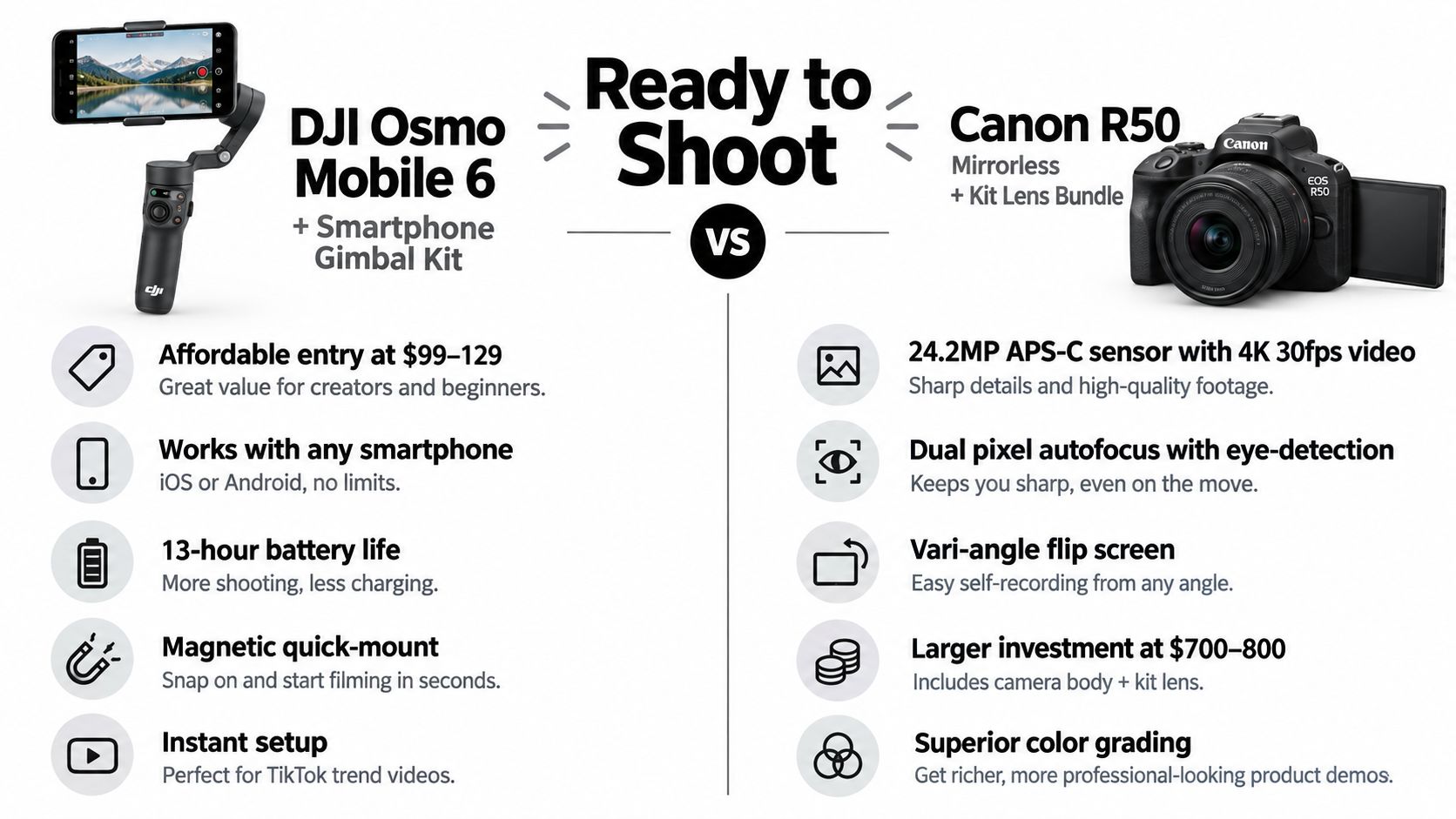
The DJI Osmo Mobile 6 works best when the concept depends on motion feeling intentional. If your videos usually look improvised in the bad sense, shaky starts, uneven framing, awkward turns, this is often the fastest fix without leaving your phone workflow.
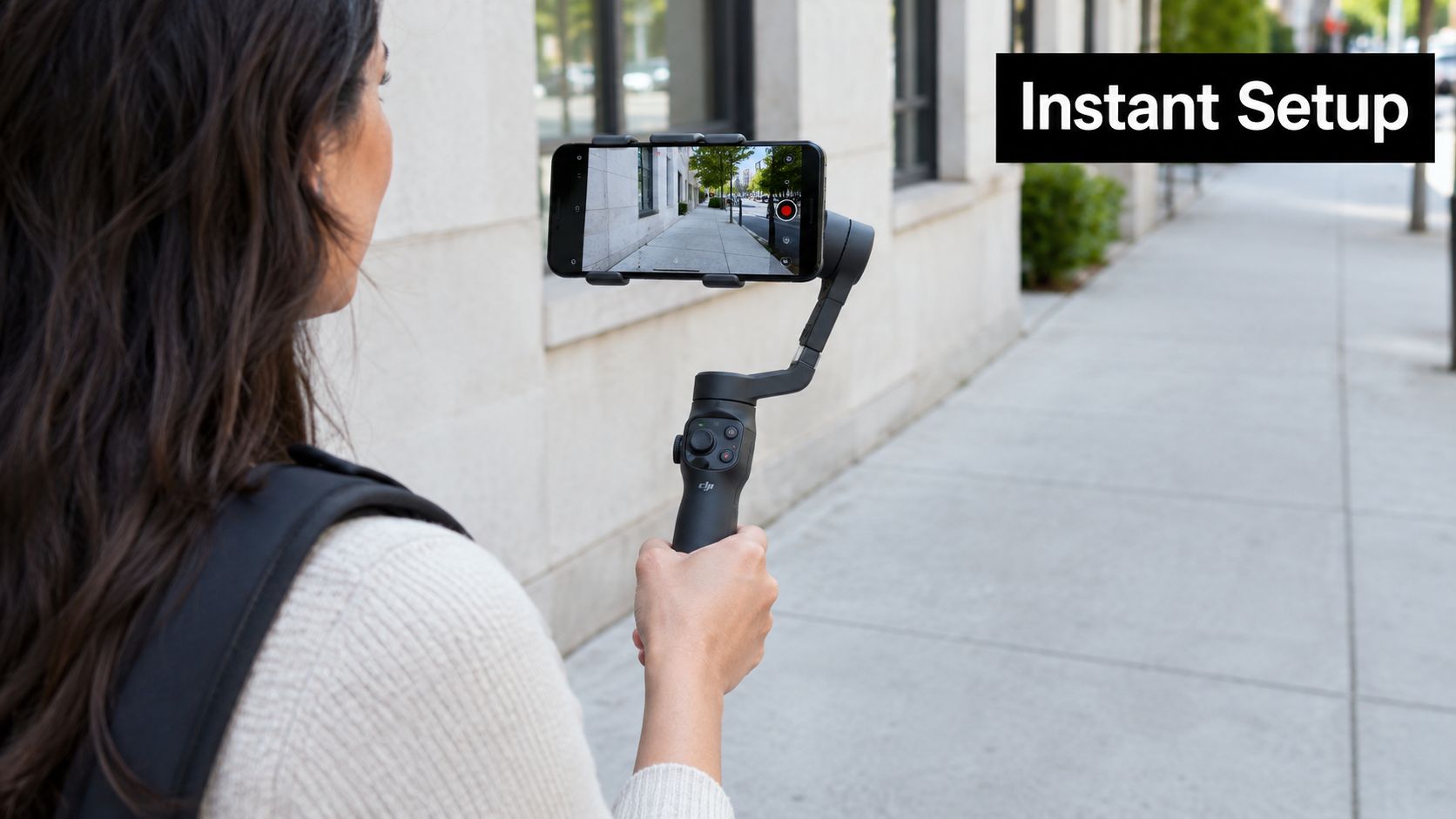
A strong ready-to-shoot concept for this setup is the guided reveal. Start with a bold hook aimed at buyers or followers who need context fast: “This is what the product looks like in real life,” or “Come with me while I test the thing everyone keeps asking about.” Then move through a simple shot order: wide approach shot, medium product pass, over-shoulder interaction, close detail, and one direct-to-camera takeaway.
Best concept for this setup
This works especially well for local businesses, lifestyle creators, and product sellers who need a location to feel part of the story. A storefront tour, studio walk-through, or moving unboxing gains more from smooth movement than from heavy editing.
Use this sequence:
- Hook on the move: Start walking into frame or toward the subject instead of opening static.
- Mid-shot explanation: Pause for one sentence that frames why the viewer should care.
- Detail cutaways: Capture hands, packaging, labels, or texture while repeating the key line.
- Exit shot: End with a movement away from the scene or toward the result.
The trade-off is simple. A gimbal improves polish, but it slows quick resets if the trend depends on rapid reaction filming. For fast meme response content, a tripod or handheld phone can be faster. For trend formats that need tracking, reveal movement, or “walk and talk” energy, the Osmo Mobile 6 is easier to justify.
Practical rule: Don't ask the gimbal to save weak framing. Decide your path first, then stabilize it.
Keep the setup friction low. Shoot in good natural light, record multiple takes in sequence before moving locations, and mix in a few static clips for edit variety. If you want more structure around short-form shot planning, this guide to short-form video production workflows is a useful companion.
2. Canon R50 Mirrorless + Kit Lens Bundle
Some concepts need cleaner separation between subject and background. That's where the Canon R50 earns its place. It gives solo creators a more deliberate image without pushing them into a full cinema workflow.
The most useful ready-to-shoot concept here is the proof-based product explanation. This suits DTC brands, beauty creators, coaches with physical products, or founders filming “why this exists” content. Open with a line that signals a problem solved: “I stopped using the old version because of this,” or “Three things I checked before recommending this.”
Shot sequence that works
The R50 handles controlled, repeatable setups well, so build the video around stable framing and focus transitions.
- Opening close-medium: Face camera and state the claim.
- Product insert: Bring the item into frame for a quick visual proof point.
- Demonstration angle: Cut to hands using the product.
- Reaction or result shot: Return to face camera with the verdict.
- CTA frame: Keep this simple and direct.
This is one of the better cameras for creators who are outgrowing the phone look but don't want a bulky rig. The win isn't only image quality. It's consistency. Once you lock framing, light, and autofocus behavior, you can repeat the same setup across a full week of posts.
That matters because short-form output is still volume-sensitive. One 2026 production benchmark recommends posting to TikTok 1 to 3 times per day, or roughly 30 to 90 videos per month, according to Krock's short-form video statistics roundup. A repeatable camera setup makes that pace more realistic.
When to choose it
Choose the R50 when your audience needs trust signals. Product demos, unboxings, founder explainers, and beauty walkthroughs all benefit from cleaner focus and more controlled color.
Skip it when the trend depends on immediate, rough-edged participation. If you need to record in ten seconds because a sound is breaking now, your phone may still win. For creators leaning into physical product storytelling, this guide on how to create unboxing videos fits naturally with the R50 workflow.
3. Insta360 X4 360° Camera Kit
You are filming a store walkthrough, a live event, or a training floor, and the best angle changes every three seconds. The Insta360 X4 solves that production problem by letting you capture the whole environment first and choose the framing later.
That changes the kind of concept you can greenlight.
Use it for ideas built around perspective shifts. A travel creator can show how crowded a viewpoint really is. A showroom brand can reveal layout, traffic flow, and product placement from one pass. A founder can record a team setup or event booth once, then cut it three different ways for TikTok, Reels, and Shorts.
One reliable format is a spatial proof concept.
Start with a specific audience promise: “See the whole setup before you decide,” or “Here's what you miss from the front angle.” Then build the edit from one continuous capture:
- Open on a wide environmental frame that establishes the space.
- Reframe to the part viewers care about most, such as the demo table, instructor, display wall, or crowd reaction.
- Cut tighter from the same source clip to isolate the product, gesture, or decision point.
- Finish with a forward-moving POV crop and one spoken conclusion.
The reason to choose this concept is coverage. One recording can produce a clean overview, a faster curiosity cut, and a more practical walk-through without asking talent to reset the scene.
Analysts in the 2026 benchmark summarized by Kinovela's benchmark summary found that 15 to 30 second videos had the highest engagement rate, while 120 to 180 second videos delivered the highest median views. The X4 fits that trade-off well because you can shoot one longer master clip and cut both versions from the same footage instead of staging separate takes.
For trend adaptation, this camera is useful when a niche format is changing faster than your shot plan. Viral.new can help surface how creators in your category are structuring venue reveals, POV clips, or multi-angle recaps. The practical advantage is not trend chasing. It is seeing the pattern early enough to shoot coverage that still gives you options in the edit.
Watch a 360 shooting approach in action before you commit to the edit style.
The trade-off is edit discipline. If you are not going to reframe with purpose, tag strong moments, and cut for a clear viewer question, a standard camera or phone setup is faster.
4. GoPro Hero 12 + Mounting Ecosystem
A trainer starts a sled push demo, a barista builds three drinks during rush, a contractor walks a client through a punch list. In each case, stopping to reset angles kills the clip. The GoPro Hero 12 works best when the concept depends on continuous action and the viewer needs to stay inside the task.
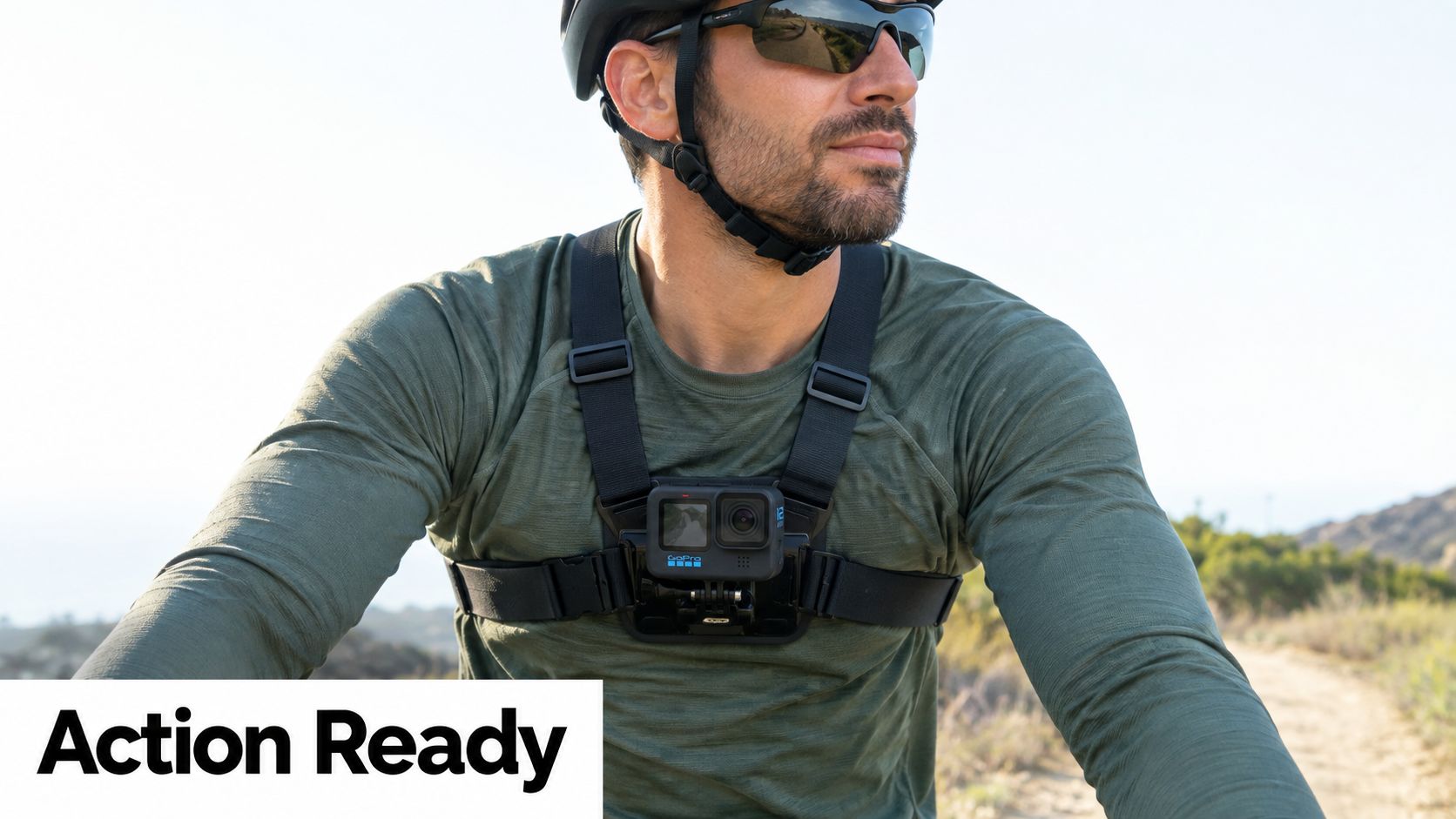
Use it for a first-person process brief. The hook is simple: show the moment where technique, speed, or decision-making happens. The audience angle is competence. They are not watching for cinematic beauty. They want to see how the work is done under real conditions.
A shoot plan for this setup is usually tighter than creators expect:
- Start with a two-second scene setter from the mount that will carry the sequence. Chest mount for hands-on work, handlebar or helmet for motion, clamp mount for fixed task stations.
- Move straight into the full action in one take. Keep the task intact instead of breaking it into coverage for every step.
- Capture one secondary angle after the main pass. Get a handheld close-up, a wide safety shot, or a result shot with a phone or second camera.
- Finish with a short spoken or text-based takeaway. One mistake to avoid, one cue to remember, or one result to look for.
That structure fits niches that sell trust through execution. Fitness coaches can show form cues from the athlete's view. Realtors can run a clean exterior-to-entry walk that shows flow between spaces. Food creators can mount low near the prep zone and let the viewer follow the order from first step to final handoff.
Mount choice matters more than camera settings here. Head mounts often drift too high and make handwork hard to read. Chest mounts usually frame the decision point better. Clamp mounts are stronger for bench work, assembly, cooking, and product tests because they remove body shake while keeping the task perspective.
Use the GoPro as the action camera in a small system, not the only camera on set. It gives you momentum and credibility during movement. It does not replace a flattering A-roll setup for direct-to-camera delivery or polished product beauty shots.
Viral.new is useful before you shoot, especially when your niche keeps changing its short-form format. Use it to check whether creators in your category are opening with pace, difficulty, risk, or result. Then build your GoPro sequence around that pattern without changing the production logic. The goal is not to copy a trend. The goal is to choose a mount and shot order that still works when the concept needs to go live fast.
Choose this concept when the process itself is the proof. If the value only makes sense once the viewer sees the motion, a GoPro with the right mount gets you there faster than a more polished setup.
5. Rode Wireless GO II + Rode Lavalier Mic Bundle
When creators say a video “looks good but doesn't hold attention,” weak dialogue is often the hidden problem. The Rode Wireless GO II solves a different kind of ready-to-shoot issue. It makes spoken content dependable.
The most effective concept for this bundle is the moving explanation. Think founder walkthrough, fitness cueing, product pitch while demonstrating, or customer education filmed in a real workspace. The hook should sound immediate and useful: “If your customers keep asking this, say it this way,” or “I wish someone had explained this before I bought mine.”
Build around voice first
A good sequence for this setup looks like this:
- Opening statement on camera: Deliver the core claim in one clean sentence.
- Action while speaking: Keep talking during a demo, walk-through, or side angle.
- Insert one proof shot: Product use, screen view, or customer-facing result.
- Close with a direct next step: Comment prompt, save prompt, or offer mention.
This setup is especially useful when your concept would fall apart if you had to redub it later. A lot of creators overestimate how easy voiceover fixes are. If the energy comes from real-time speech, record it cleanly the first time.
The practical trade-off is visibility. A visible lav mic can make some beauty, fashion, or luxury videos feel less polished. In educational, coaching, product-demo, and founder content, viewers usually accept it because clarity matters more than hiding the gear.
Execution notes
Keep the mic placement consistent and test the location before the full take.
- Mic placement: Clip the lav below the mouth where fabric won't rub.
- Backup habit: Record a safety track when the take matters.
- Movement test: Walk the exact route once before the take.
- Noise control: Turn off fans, music, and nearby machines if dialogue is the lead.
This is the setup to pick when the idea's value sits in what you say, not only what you show.
6. Neewer RGB Ring Light + Tripod Stand Kit
A creator sets a product on the desk, hits record, and the footage looks dull before the pitch even starts. The fix is often lighting, not a different camera. The Neewer RGB Ring Light + Tripod Stand Kit suits concepts where the visual shift is the hook and the set needs to stay repeatable across multiple takes.
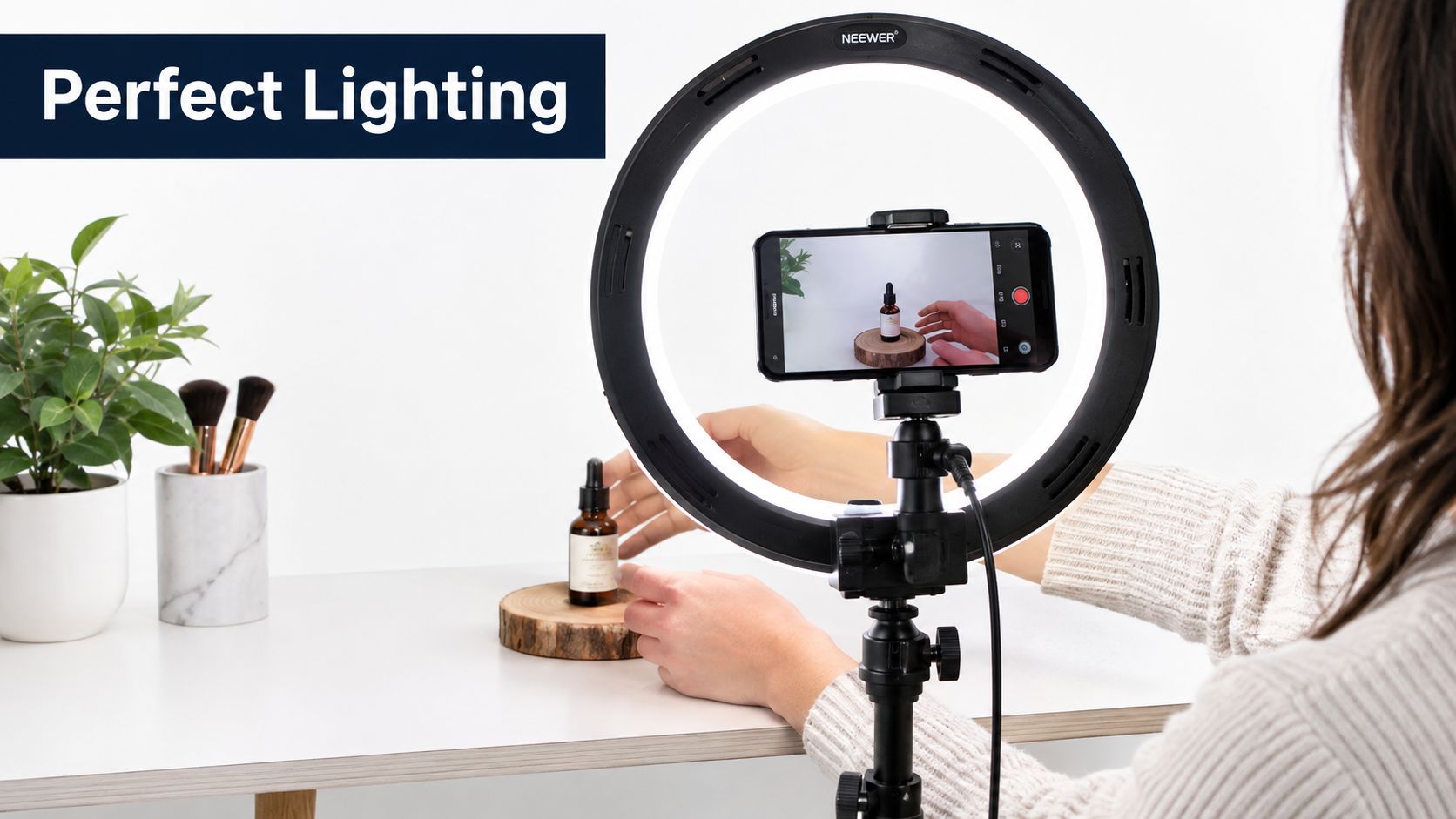
Use it for a lighting-led transformation brief. This format fits skincare, jewelry, accessories, desk setups, creator tools, and founder content where polish affects trust. The audience angle is simple. Show viewers what changes once the subject is lit correctly, then explain why that difference matters in actual use.
A clean shooting sequence looks like this. Start with the subject under bad room light for one second. Cut to the same framing with the ring light dialed in. Hold on a hero angle that shows texture, finish, or skin tone clearly. Then add one practical shot of the item being worn, opened, or used so the improvement does not feel cosmetic only.
The reason to choose this concept is speed. Camera position stays fixed. Talent movement stays minimal. If you need five versions for different hooks, offers, or audience segments, the setup holds steady while the script changes.
There is a trade-off. Ring lights flatten some subjects and can create obvious circular catchlights or glare on glossy packaging. For reflective products, adjust height and angle first, then lower brightness before changing the product position. In production, glare usually comes from light placement, not from the item itself.
Viral.new is useful at the concept stage here. It can help identify which visual angles are trending in your niche, such as skincare texture reveals, desk glow aesthetics, or before-and-after creator setups, so you can adapt the hook without rebuilding the shot plan. That matters when you want trend alignment but still need a setup you can film today with one stand, one light, and a short shot list.
Pick this when surface detail, color control, and consistency carry the video. Pass on it when the idea depends on movement through a space or a raw handheld feel.
7. Sony ZV-1 II Compact Camera Kit
The Sony ZV-1 II is one of the easiest cameras to use when you're both talent and operator. It suits creators who film alone, need a flip screen, and want cleaner talking-head or product-focused footage without carrying a bigger body and lens kit.
The best ready-to-shoot concept for this camera is the objection-answer video. Coaches, founders, product sellers, and service businesses can all use it. Start with the hesitation your viewer already has: “You think this won't work for your situation,” or “People stop here because they assume this part is complicated.”
A practical filming pattern
This camera is strong when the shot changes are small but meaningful.
- Frame 1: Direct eye-level hook.
- Frame 2: Hold product near lens for a visual answer.
- Frame 3: Demonstrate one action while face priority focus stays locked.
- Frame 4: Return to face camera with the conclusion.
That pattern creates enough edit movement without building a complicated shot list. It's also well suited to creators who need to record several niche variations in one sitting.
There's another reason this setup makes sense for TikTok-first production. According to discussion from filmmakers about set language, “ready to shoot” is commonly understood as a practical signal that a take is about to start, yet there's still limited accessible guidance on the actual workflow around that moment. The ZV-1 II fits that gap well because solo creators can create their own compact pre-take routine: framing check, audio check, product placement, then record. No crew language needed, but the discipline still matters.
Why pick this over a larger camera
Pick the ZV-1 II when you care more about speed than lens flexibility. It's a strong middle ground for educational content, product explainers, and self-facing brand videos. If you want a simple operating rhythm for solo recording, this breakdown of how to film TikTok videos fits the way this camera gets used.
8. Smartphone Rig Stabilizer + Wide-Angle Lens Combo
You're filming three short videos in a bakery before the lunch rush starts. There's no time to swap camera bodies, rebalance a gimbal, or rebuild audio between takes. A smartphone rig with a wide-angle lens handles that job well because the setup stays assembled, the framing is flexible in tight spaces, and the operator can go from counter shot to selfie explanation in seconds.
Use this setup for a location-led niche brief. It suits local businesses, service creators, educators, travel shooters, and product sellers who need the environment to sell the point as much as the script does. The wide lens earns its place when the room matters. The rig earns its place when speed and repeatability matter.
A practical version looks like this:
Start with a fast hook aimed at one audience slice, such as “If you run a small café and your pastry case never looks as good on camera as it does in person.” Then cut to a moving establishing shot that shows the full workspace, shelves, counter, or street context. Follow with one proof shot at normal lens distance if a face, menu item, or product starts bending at the edges. End on a locked CTA frame with the same mic, hand position, and screen direction you plan to use across the whole batch.
That sequence gives each clip a job. Hook, context, proof, action.
The trade-off is optical distortion. Wide smartphone lenses make cramped interiors look better, but they can stretch faces, hands, and product edges if you get too close. Keep people near the center of frame, step back for talking shots, and save the widest look for room reveals or walk-ins. In production, that matters more than gear specs because it decides whether the footage looks intentional or just convenient.
This combo is also one of the easiest systems to batch against current trend angles. Viral.new can surface niche-specific hooks or formats, and you can slot them into the same location-first shooting plan without changing the rig. That keeps trend adaptation tied to a shootable sequence instead of turning every new idea into a fresh setup problem.
The reason to choose this concept is simple. It lets creators keep production mobile while still building a repeatable visual language. If the goal is to film today, in a real business, home studio, shop floor, or street location, this setup removes friction without flattening the concept.
Ready-to-Shoot Gear: 8-Item Comparison
| Item | Implementation Complexity 🔄 | Resource Requirements ⚡ | Expected Outcomes 📊 / ⭐ | Ideal Use Cases 💡 | Key Advantages ⭐ |
|---|---|---|---|---|---|
| DJI Osmo Mobile 6 + Smartphone Gimbal Kit | Low 🔄, instant setup, minimal learning | Low ⚡, uses smartphone; battery on gimbal; affordable | ⭐⭐⭐ 📊 Smooth stabilized pans/tracking; polished short-form transitions | Solo mobile creators, walking/trend videos, quick product showcases | Compact, magnetic mount, ActiveTrack, long battery |
| Canon R50 Mirrorless + Kit Lens Bundle | Moderate 🔄🔄, camera setup, accessories recommended | Moderate ⚡, $700–800, lenses, external mic, batteries | ⭐⭐⭐⭐ 📊 Elevated image quality, reliable AF, 4K for grading | Product demos, reviews, lifestyle creators needing cinematic look | Dual Pixel AF, 4K, flip screen, compact APS-C system |
| Insta360 X4 360° Camera Kit | High 🔄🔄🔄, capture strategy + reframing workflow | High ⚡, $1,099+, large storage, powerful editing PC | ⭐⭐⭐⭐📊 One-take multi-angle content; immersive/novel transitions | Travel, immersive demos, creators maximizing content per shoot | 8K 360 capture, FlowState stabilization, reframing flexibility |
| GoPro Hero 12 + Mounting Ecosystem | Low–Moderate 🔄🔄, simple operation; many mount options | Moderate ⚡, ~$399, mounts, spare batteries | ⭐⭐⭐ 📊 Rugged, high-frame-rate POV and action footage | Action, travel, outdoor creators and movement-heavy trends | HyperSmooth, waterproof, extensive mounting ecosystem |
| Rode Wireless GO II + Rode Lavalier Mic Bundle | Low–Moderate 🔄🔄, mic placement and levels tuning | Moderate ⚡, ~$299, windscreens, battery management | ⭐⭐⭐⭐ 📊 Broadcast-quality, reliable dual-channel dialogue | Interviews, tutorials, talking-heads, multi-subject shoots | Dual transmitters, backup recording, compact hidden lavs |
| Neewer RGB Ring Light + Tripod Stand Kit | Low 🔄, plug-and-play lighting | Low ⚡, $80–150, USB/battery powered, remote control | ⭐⭐⭐ 📊 Even flattering light; brand-matched color aesthetics | Product close-ups, beauty/tutorials, talking-head content | RGB control, high CRI, dimmable, portable and affordable |
| Sony ZV‑1 II Compact Camera Kit | Moderate 🔄🔄, camera setup; some settings to optimize | Moderate–High ⚡, ~$1,198, optional mics/Accessories | ⭐⭐⭐⭐ 📊 Superior image/audio for solo creators; product showcase ready | Vloggers, solopreneurs, product-focused creators needing bokeh | 1" sensor, Product Showcase mode, directional mic, flip screen |
| Smartphone Rig Stabilizer + Wide‑Angle Lens Combo | Moderate–High 🔄🔄🔄, balance, cold‑shoe layout, battery swaps | Moderate ⚡, $200–400, heavier, removable battery advised | ⭐⭐⭐ 📊 Consolidated workflow; longer runtime and wider framing | Mobile creators shooting long batches, multi-tool setups | Integrated battery, mounts for mic/light, wide-angle converter |
Choose the Concept You Can Film Today
The best ready-to-shoot concept isn't the most cinematic one. It's the one that fits your current location, your available gear, and the action you can complete before momentum fades. If you're at your desk, film the tabletop reveal. If you're on-site, record the guided walk-through. If your audience needs explanation, prioritize audio and a direct-to-camera structure.
That decision-making gets easier when you stop treating every trend like a custom production. Pick one format, then reduce it to a repeatable mini brief. One hook variation. One main take. One alternate angle. One simple call to action. That's enough to move from idea to publishable asset without overbuilding.
For TikTok specifically, planning the cut before you film matters more than many creators admit. As noted earlier, short-form benchmark data shows a clear trade-off between engagement and view depth depending on clip length. That doesn't mean every trend needs two edits. It means you should know whether this post is meant to earn interaction fast or hold attention longer before the camera rolls.
There's also a practical publishing point behind all of this. If you're aiming for a steady TikTok cadence, your content system can't rely on inspiration alone. You need concepts that are easy to repeat with small changes in hook, location, prop, or audience angle. The creators who stay consistent usually aren't inventing from zero every day. They're using a production pattern that turns trend signals into fast, filmable prompts.
That's where a tool like Viral.new fits naturally. It can help surface niche-specific prompts that already point toward a viable format, then you can pressure-test each one with a few simple questions. Can I film this with today's gear? Does the hook work in one sentence? Do I know the first three shots? If the answer is yes, it's ready. If not, it's still brainstorming.
Use the same structure each time a new idea lands. Define the audience angle. Write the hook. List the shot order. Note the one execution risk. Decide why this version is worth filming now. Once that becomes routine, daily inspiration stops feeling messy and starts functioning like a real publishing workflow.
The goal isn't to wait until everything is perfect. The goal is to make the next good video easier to shoot than the last one.
Viral.new sends daily TikTok ideas built around current niche trends, with prompts you can turn into a hook, shot list, and filming plan quickly. If you want more concepts that already feel ready to shoot instead of vague brainstorming, visit Viral.new and use it as the front end of your production workflow.
